How to Handle Rush Orders Without Breaking Your Production Schedule
Every job shop gets rush orders. The ones that handle them without chaos have one thing in common: a live capacity view that shows immediately which machines have open windows.
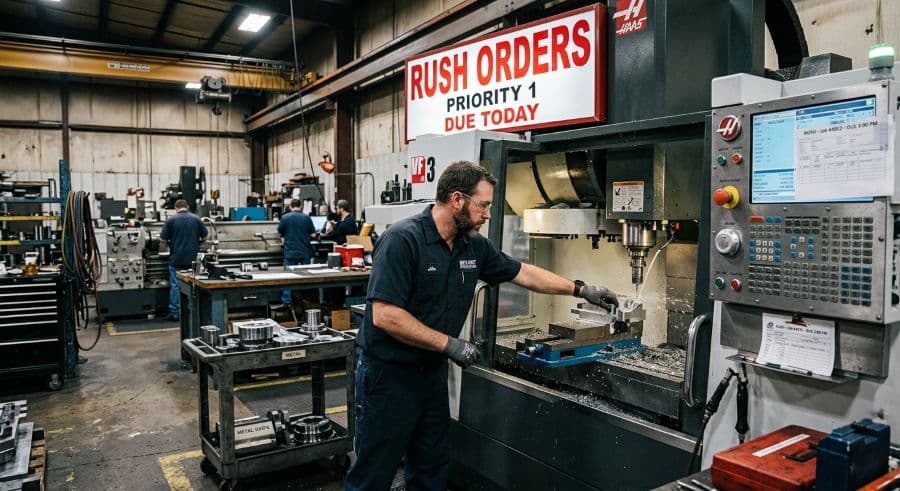
A rush order is a capacity decision wearing a sales decision's clothes
A customer calls at 3:40 on a Thursday. They need 400 brackets by Tuesday — a part you can run, on a machine you have, with material you can get by Friday. The job is worth real money and the customer is one you want to keep. Saying yes is easy. The hard part starts the second you hang up.
Because your schedule was already full. Every machine that can run those brackets is committed to other jobs, each with its own due date and its own customer. Slotting in the rush order means moving something. Moving something means moving the next thing. By the time the cascade settles, you've either pushed three other jobs into late territory or quietly signed up for a Saturday of overtime to cover the gap.
That's the rush order problem, and it isn't really a sales problem. It's a capacity problem in a sales problem's clothing. The shops that handle rush orders calmly aren't the ones with looser standards or more slack on hand. They're the ones who can see, in a minute or two, exactly what a new job displaces and whether the shop can absorb it. This article covers how to get there: a triage rule for deciding which rush orders to take, and the live capacity view that makes slotting them in fast instead of frightening.
Why a schedule that looks full on paper breaks when you force a job into it
Every rush order you accept has to land somewhere. In a shop that's already booked, "somewhere" means on top of work that's already scheduled — so the job underneath it slides, and the one after that slides, and the disruption ripples down the line of every machine the rush touches.
When the schedule lives in a spreadsheet or on a whiteboard, that ripple is invisible until you trace it by hand. You move the brackets onto the press brake, then you have to find what the brackets bumped, find a new home for it, check that the new home doesn't collide with a setup or a due date, and repeat. That manual resequencing is where the time goes, not in running the rush job but in untangling everything around it.
It's also where money leaks. A scheduling conflict that actually reaches the floor — a double-booked machine, a job that shows up at a workstation that isn't ready — costs $250–$1,000 per incident in machine restarts, resequencing labor, and lost capacity (Product Brief §2). Rush orders are conflict factories precisely because they're inserted under pressure, after the schedule was built, when the person doing the inserting can't see the whole board at once. Preventing those collisions is its own discipline; if you're fighting them weekly, start with how scheduling conflicts actually originate on the floor.
Step back and the pattern is bigger than any single rush job. Manual scheduling inefficiency — the resequencing, the expediting, the firefighting — drains an estimated 5–10% of revenue in a typical job shop (Qlector 2025). For a $2M shop, that's $128,000–$276,000 a year disappearing into work that produces nothing. Rush orders aren't the whole of that number, but they're one of its most reliable contributors.
The real cost of a rush order is what it displaces, not what it earns
Here's the trap. When the call comes in, the only number you can see clearly is the value of the rush job itself. The cost of taking it — three other jobs running late, a strategic customer's order slipping, a weekend of premium labor — stays invisible until the consequences show up as their own phone calls next week.
So the decision gets made on the visible number and the shop eats the invisible one.
This is the reframe that changes how a shop handles rush orders: accepting one is a trade, and the thing you're trading away is capacity you'd already promised to someone else. The question is never just "can we run this?" It's "what moves if we do, and can we live with what moves?" You can't answer that honestly if you can't see what moves.
That's the gap most rush order scheduling lives in. The yes happens fast and confident at the front of the shop; the displacement gets discovered slowly and painfully at the back. Closing that gap — making the displacement visible at the moment of the yes — is the entire game.
Build a rush order triage rule before the phone rings
The worst time to decide whether to take a rush order is while the customer is on the line waiting for an answer. Pressure plus no framework equals reflexive yes. Build the framework ahead of time so the in-the-moment decision is fast and consistent.
A workable triage rule comes down to four questions:
- Is the deadline real or padded? A lot of "I need it Tuesday" is a customer building in their own buffer. A direct "what happens if it lands Thursday instead?" sorts genuine emergencies from default urgency more often than you'd expect.
- What's the margin, and does it justify the disruption? A rush job at standard pricing that forces overtime and bumps three other orders can lose money even though the invoice looks healthy. Rush work that displaces other work should usually carry rush pricing.
- Is this a customer worth protecting? A top-five account that rarely asks for favors is a different decision than a one-off order from a buyer you'll never see again. Strategic weight is a legitimate input.
- What does it actually displace? This is the one that requires real information, not judgment — and it's the one most shops can't answer quickly. Everything above is policy you can set in advance. This one you have to look up, in real time, every time.
Write the first three down as a standing rule so anyone authorized to commit a date applies the same logic. The fourth is where hot job scheduling stops being a policy question and becomes a visibility question — which is the rest of this article.
What fast rush order scheduling actually looks like in a job shop
The difference between a shop that absorbs rush orders and one that's wrecked by them usually isn't discipline or pricing. It's whether the scheduler can see open capacity at a glance.
Picture the two ways this goes. In the first, the schedule is a spreadsheet or a whiteboard. To place the rush job, you scan across machines and time, hold a dozen due dates in your head, mentally test where it could fit, and then start the resequencing by hand. That's the version where expediting a single production schedule eats an afternoon, and where a missed collision shows up as a $250–$1,000 incident on the floor next week.
In the second, the schedule is a live, visual capacity view. Open windows on each machine are visible immediately. You drag the rush job into a gap, and the tool flags any conflict it creates instead of letting you discover it later. What displaces what is on screen, not in your head. The decision that took an afternoon takes the length of the phone call.
That's the whole promise of a visual machine scheduler with a live capacity view: the open windows are already drawn for you. Knowing where the gaps are in the first place is upstream of any of this. If your capacity picture is fuzzy, the place to start is calculating real machine capacity for a job shop, because a rush order you can't place is usually a capacity number you never had.
None of this requires more machines or more people. It requires the schedule to be something you can see and move, instead of something you reconstruct by hand every time the phone rings.
Keep a deliberate buffer so "rush" doesn't always mean "overtime"
There's a structural reason rush orders feel impossible: a lot of shops schedule to 100% of stated capacity, which leaves nothing to absorb the unplanned work that arrives every single week.
Some of that "full" is an illusion worth checking. A shop running two shifts, five days, covers 80 of the 168 hours in a calendar week — so a schedule that looks packed against working hours still has structural room against the calendar. The constraint is usually labor and setup, not raw machine time. That's worth knowing before you assume there's nowhere to put anything.
The practical move is to stop scheduling every machine to the brim. Shops that handle rush work without constant overtime tend to hold a slice of each machine's time deliberately uncommitted — not idle, just unbooked — as the landing zone for the rush order everyone knows is coming. When it arrives, it drops into reserved space instead of detonating the existing plan. When it doesn't, you pull forward the next scheduled job and lose nothing.
A buffer feels like leaving money on the table right up until the Thursday afternoon call, at which point it's the difference between a calm yes and a weekend of premium labor.
Once you can see the trade-off, you can have the honest conversation
The hidden benefit of seeing displacement in real time is that it makes you honest with everyone, including the customer who made the original promise.
When a rush request would push an existing order late, you have a real decision to surface, not a silent one to absorb. Sometimes the answer is yes and the rush gets priced and slotted. Sometimes it's "we can hit Tuesday, but it moves your other job to Thursday — which matters more to you?" Customers handle that conversation far better than they handle a part that's simply late with no warning. The shops that protect their on-time delivery numbers while still saying yes to rush work are the ones that turned displacement from a surprise into a conversation.
That conversation is only possible when you can see the trade-off in the moment. You can't negotiate a delivery date you can't yet calculate.
The shops that stay calm under rush orders aren't faster typists
Rush orders are not a problem you solve once. They're a permanent feature of running a job shop, and the goal isn't to eliminate them — it's to make absorbing them routine instead of traumatic. That comes down to three things you can put in place this quarter: a triage rule so the take-it-or-not decision is fast and consistent, a deliberate capacity buffer so the answer isn't automatically overtime, and a live view of the schedule so you can see what a new job displaces before you commit to it.
The first two are policy. The third is the one that changes the day-to-day, because it's the one that turns "let me check and call you back" into an answer you can give while the customer is still on the phone.
If you want to see how a live capacity view handles the open-window question, the visual scheduler walks through exactly that, and there are downloadable scheduling tools and templates if you'd rather start lighter. When you're ready to test it against your own shop's worst rush-order week, you can try MachineScheduler free for 14 days, with no credit card required.
Ready to go beyond the guide?
Most shops are on a live Gantt board within 60 minutes of sign-up, with their existing job list imported from Excel.
Get shop floor scheduling guides in your inbox
Practical articles for production managers — no spam, unsubscribe anytime.
Related articles
The 5 Production Scheduling KPIs Every Job Shop Should Track
Most job shops track OTD when a customer complains. The shops that consistently hit their due dates track five metrics w…
How to Improve On-Time Delivery in a Job Shop: A Practical 5-Step Guide
On-time delivery starts with knowing — before the customer calls — which jobs are at risk. Here's a 5-step guide to impr…
How to Prevent Scheduling Conflicts on the Shop Floor (Before They Cost You)
A scheduling conflict that reaches the shop floor costs $250–$1,000 in machine restart, resequencing, and lost capacity.