The 5 Production Scheduling KPIs Every Job Shop Should Track
Most job shops track OTD when a customer complains. The shops that consistently hit their due dates track five metrics weekly.
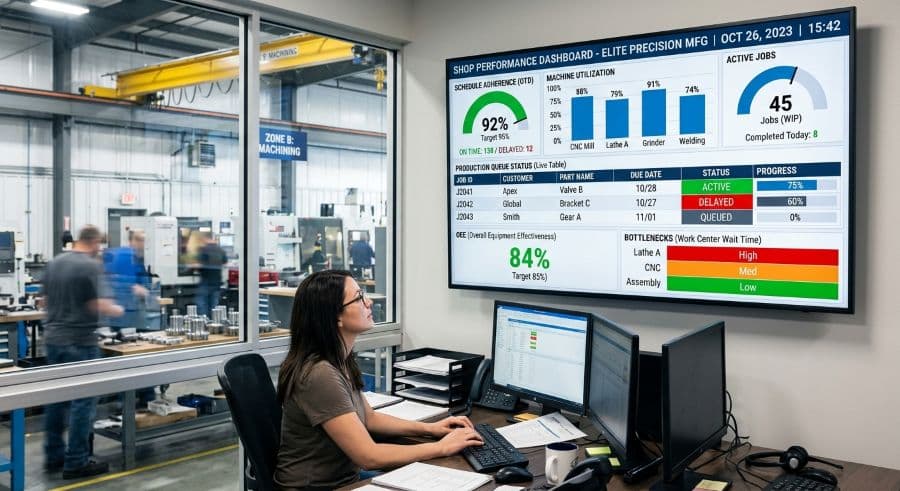
You usually find out you're late when the customer calls
Here is how the average job shop measures its schedule: a customer calls asking where their parts are, someone walks out to the floor to find the job, and the answer comes back that it's still two operations behind. That is the entire measurement system. It runs on phone calls and bad news.
The shops that hit their due dates week after week do something different, and it isn't complicated. They look at a handful of numbers on a fixed cadence — usually weekly — and those numbers tell them which jobs are at risk before the customer has a reason to call. They aren't running a data science operation. They're tracking five things.
This is a guide to those five production scheduling KPIs: on-time delivery, machine utilization, schedule adherence, scheduling conflict rate, and Overall Equipment Effectiveness. For each one you'll get the definition, how to calculate it with numbers you already have, and how often to actually look at it. No dashboards you'll never open, no twenty-metric scorecard that dies after three weeks. Five metrics, tracked consistently, beat a hundred metrics tracked once.
Why five metrics beats twenty
Most articles about manufacturing KPIs for a job shop hand you a list of thirty and wish you luck. That list is the problem, not the solution. A 25-person shop doesn't have a continuous-improvement department to maintain it. Whoever owns scheduling already has a full day, and a scorecard that takes two hours to update on Friday afternoon gets abandoned by week four.
The five below were chosen on a specific test: each one either tells you whether you're keeping your promises to customers, or tells you why you're not. Everything else is downstream of those two questions. Track these five and you can answer, on any given Wednesday, whether this week is going to be fine or whether you need to move something. That's the whole point of measuring a schedule — to act earlier, while you still have options.
A note before the list: every one of these is more useful as a trend than as a single number. One week's on-time rate tells you almost nothing. Eight weeks of it tells you whether your shop is getting better, getting worse, or holding steady. Track the direction, not just the dot.
KPI 1: On-time delivery rate — the one that pays the bills
On-time delivery (OTD) is the percentage of jobs you shipped by the date you promised. It's first on the list because it's the metric your customers are quietly keeping themselves, whether you track it or not.
The calculation is simple:
OTD rate = (jobs shipped on or before the promised date ÷ total jobs shipped) × 100
Ship 40 of 45 jobs on time in a week and your OTD is 89%. The only discipline required is deciding, in advance, what "on time" means — promised ship date, promised dock date, or customer-requested date — and measuring against the same definition every time. Shops that quietly move the goalposts ("well, we told them Friday but they didn't really need it until Monday") are lying to themselves and will keep missing dates.
What makes OTD a scheduling KPI rather than a shipping KPI is when you can see it coming. If you only calculate it after the job ships, it's a report card. If your schedule shows you that a job due Thursday is still sitting two operations upstream on Tuesday, OTD becomes a forward-looking signal — and you can pull the job ahead, add a shift, or call the customer while a heads-up is still useful instead of an apology. That early-warning view is the difference between a shop that manages OTD and one that just records it. For the full breakdown of root-causing missed dates and building a workflow around them, see our guide to improving on-time delivery in a job shop.
Track it weekly. Watch the eight-week trend.
KPI 2: Machine utilization rate — but read it carefully
Machine utilization tells you how much of a machine's available time is actually spent running jobs. It's one of the most misread numbers in a job shop, so it's worth getting precise.
Utilization = (hours the machine spent running ÷ hours the machine was available) × 100
The trap is the denominator. "Available" is not 24 hours a day, and it's not even your shift hours minus lunch. If you run a single shift, Monday to Friday, your machines are physically available about 40 hours out of the 168 hours in a week. A two-shift M–F operation runs 80 of those 168 hours. That means calendar utilization — running hours against the whole week — is structurally capped below 50% for a two-shift shop no matter how well you schedule. There's nothing wrong with that; it's just arithmetic. The mistake is comparing a single-shift shop's utilization to a three-shift shop's and concluding one is "underperforming."
So track utilization against available hours (the time the machine was actually staffed and ready), and track it per machine, not as a shop-wide average. A shop-wide number hides the fact that your two-axis lathe is slammed at 95% while the big horizontal mill sits at 30%. The per-machine view is what tells you where your real bottleneck is and whether you should be quoting more work onto the idle assets.
Utilization is also the metric most worth turning into a repeatable calculation rather than a one-off guess. If you want a worked example and a tracker you can run on your own machine hours, use our machine utilization rate calculator.
Track it weekly per machine. Use it to find idle capacity, not to flog the floor.
KPI 3: Schedule adherence — are you running the plan you made?
Schedule adherence measures the gap between the schedule you committed to and what actually happened on the floor. OTD asks "did the customer get their parts on time?" Schedule adherence asks the upstream question: "did we run the jobs in the order and the timing we planned?" You can technically hit OTD while your schedule is chaos underneath — by expediting, working overtime, and burning your buffer. Schedule adherence is the early warning that you're holding the line through brute force.
A practical way to calculate it:
Schedule adherence = (operations completed in the planned period ÷ operations that were scheduled for that period) × 100
Scheduled 120 operations for the week and finished 102 of them on plan? That's 85% adherence, and the 18 that slipped are your story for the week. The number itself matters less than what's behind it. Low adherence almost always traces to one of a few causes: estimates that are systematically too optimistic, a machine that keeps going down, materials arriving late, or a rush order that blew up the sequence. Tracking adherence week over week turns those from anecdotes into a pattern you can actually fix.
Set your own target and watch the trend rather than chasing someone else's benchmark — a shop running long-cycle mold work and a shop running high-mix short runs will live at very different adherence levels, and both can be healthy. What you're looking for is a number that's stable or climbing, not one quietly eroding while everyone insists things are fine.
Track it weekly. Treat a falling trend as a diagnostic, not a scolding.
KPI 4: Scheduling conflict rate — the cost hiding in plain sight
A scheduling conflict is any time two jobs are planned onto the same machine for the same window, or a job is scheduled onto a machine that's already committed, down, or short an operator. Most shops don't count these. They should, because each one carries a real, measurable cost.
A scheduling conflict that reaches the shop floor costs $250–$1,000 per incident in machine restart, resequencing, and lost capacity (Product Brief §2). Do the arithmetic on your own shop. Two conflicts a week, at the midpoint of that range, is roughly $65,000 a year in pure friction — money spent producing nothing, just untangling a knot that shouldn't have existed. That math is the case for tracking the metric: a conflict rate isn't an abstract quality score, it's a dollar figure you can attack.
Conflict rate = number of scheduling conflicts that reached the floor ÷ total jobs scheduled (express per week or per month, whichever gives you a stable count).
The reason conflicts happen at all is usually that the planning tool can't see capacity. A spreadsheet will happily let you book 30 hours of work onto a machine that runs 8 hours a day, because a spreadsheet doesn't know the machine exists. Tools that enforce real capacity limits catch the double-booking at the moment you create it, before it ships to the floor as someone else's problem. We cover the mechanics of catching these early in our guide to preventing scheduling conflicts before they hit the floor.
Track it monthly if your volume is low, weekly if it isn't. Drive it toward zero.
KPI 5: Overall Equipment Effectiveness — the honest machine score
Overall Equipment Effectiveness (OEE) is the most complete single measure of how well a machine is actually producing, and it's the metric most job shops have never calculated. It rolls three things into one number:
OEE = Availability × Performance × Quality
- Availability — was the machine running when it was supposed to be? (Downtime, changeovers, and waiting-for-material all cut into this.)
- Performance — when it ran, did it run at its rated speed? (Slow cycles, minor stops, and reduced feeds cut into this.)
- Quality — of what it produced, how much was good the first time? (Scrap and rework cut into this.)
Multiply the three and you get a single percentage that's brutally honest, because a weak link anywhere drags the whole number down. A machine that's available 90% of the time, runs at 90% of rate, and yields 90% good parts is not at 90% OEE — it's at 0.9 × 0.9 × 0.9 = 73%. That compounding is the point. It's why a machine that "feels" busy can still be quietly leaking effectiveness.
For context, the world-class OEE benchmark is 85% (Nakajima/TPM literature). Most SMB shops land well below that the first time they calculate it honestly, and that's normal — the first measurement isn't a grade, it's a baseline. The value is in watching your own number climb as you fix the biggest of the three drags. If you want the full plain-English walkthrough with worked examples, start with our OEE calculation guide for manufacturers.
Track OEE monthly on your bottleneck machines first. Don't try to track it everywhere at once — start with the assets that gate your throughput.
How to actually track these every week without a data project
Five KPIs is deliberately a small enough number to maintain by hand, and you should start by hand. A one-page sheet — five rows, one column for this week's value, a few columns for the trailing weeks — is enough to get the habit going. The discipline that matters isn't the tooling, it's the cadence: same time every week, same definitions every time, someone whose actual job it is to update it.
What a spreadsheet won't do is give you the forward-looking version. By the time you calculate last week's OTD, the jobs are already shipped or already late. The leverage in all five of these production scheduling KPIs comes from seeing them before the period closes — knowing on Tuesday that Thursday's job is at risk, seeing the conflict the moment it's created instead of when the machine sits idle. That live view is the difference between scheduling metrics that report history and scheduling metrics that change outcomes, and it's the main reason small manufacturers eventually outgrow the spreadsheet.
If you're at the stage of building a real measurement habit, the free templates and trackers in our store are a reasonable place to start — they'll get you a clean baseline on your own numbers without committing to anything. And when you want these five metrics computed live off your actual schedule rather than reconstructed after the fact, you can try Visual Machine Scheduler free for 14 days, no credit card required. Either way, the next step is the same one the on-time shops already took: pick the five numbers, look at them every week, and act on the trend while you still can.
Ready to go beyond the guide?
Most shops are on a live Gantt board within 60 minutes of sign-up, with their existing job list imported from Excel.
Get shop floor scheduling guides in your inbox
Practical articles for production managers — no spam, unsubscribe anytime.
Related articles
How to Handle Rush Orders Without Breaking Your Production Schedule
Every job shop gets rush orders. The ones that handle them without chaos have one thing in common: a live capacity view …
How to Improve On-Time Delivery in a Job Shop: A Practical 5-Step Guide
On-time delivery starts with knowing — before the customer calls — which jobs are at risk. Here's a 5-step guide to impr…
How to Prevent Scheduling Conflicts on the Shop Floor (Before They Cost You)
A scheduling conflict that reaches the shop floor costs $250–$1,000 in machine restart, resequencing, and lost capacity.