How to Schedule Shifts on a CNC Machining Floor: A Production Manager's Guide
Scheduling a 2-shift or 3-shift CNC machining operation is fundamentally different from a single-shift shop.
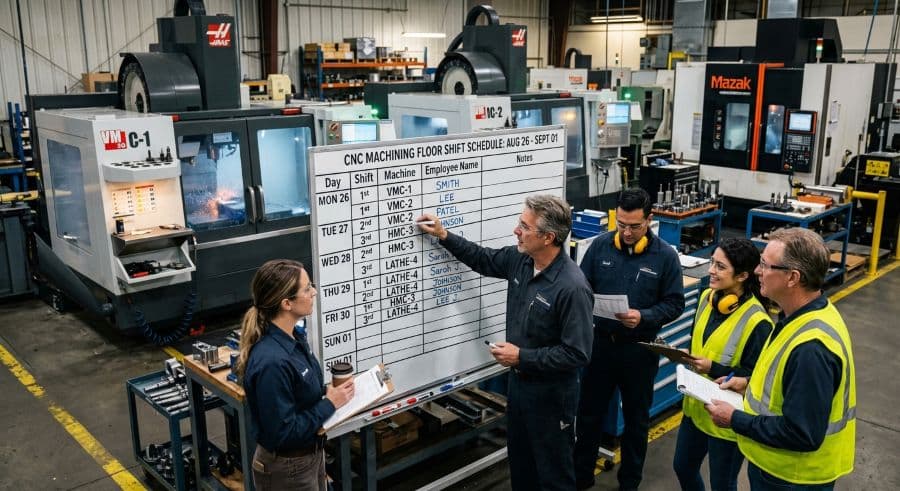
The machine doesn't clock out — the operator does
It's 3:10 PM. First shift is heading for the parking lot. On Machine 4, a setup that was supposed to be proven and running by end of day is still in the dial-in stage — the day-shift setter ran out of time. Second shift inherits a machine that's down, a job that's behind, and a lights-out run that was supposed to start an hour ago.
That moment is the whole difference between a single-shift shop and a multi-shift one. On a single-shift floor, the schedule lives inside one continuous block of time with one operator per machine. When the lights go off, everything stops in a known state and picks up the next morning. A 2-shift or 3-shift CNC operation has no such luxury. The machine keeps running across a boundary the people don't cross. The job in the spindle outlives the operator who started it.
That is why CNC machining shift scheduling is not a staffing-roster problem. It is a machine-continuity problem wearing a staffing problem's clothes. You can get the roster perfect and still blow every due date if the schedule doesn't survive the handoff.
This guide covers how to schedule a 2-shift or 3-shift CNC floor around the three things that actually decide whether the plan holds: per-machine capacity, the shift handoff, and conflict detection before the floor finds the conflict for you.
Why multi-shift CNC scheduling breaks single-shift logic
Single-shift scheduling has a hidden assumption baked into it: one operator owns one machine for the entire run. The person who sets the job is the person who runs it, watches it, and shuts it down. Continuity is automatic because nothing changes hands.
Multi-shift CNC scheduling removes that assumption. The job is now longer than the person's presence. A 6-hour cycle started at 1 PM finishes at 7 PM — two hours after the operator who loaded it went home. The machine doesn't care which shift it is. The schedule has to.
This is also why "just add another shift" rarely delivers the capacity the spreadsheet promised. Adding people increases the hours a machine can be attended, but it also doubles or triples the number of handoffs, the number of setters who can leave a setup half-finished, and the number of times a verbal note about a finicky job fails to make it across the boundary. The throughput gain is real, but so is the new failure surface. Multi-shift manufacturing scheduling lives or dies on how well you manage that surface.
The shops that run two or three shifts well don't treat each shift as a fresh start. They treat the floor as one continuous machine plan that people rotate through.
Start with per-machine capacity, not headcount
The instinct when planning shifts is to start with people: how many operators, what skills, who covers nights. That is the wrong starting point for a CNC floor. Start with the machines, because the machine is the constraint that bills the customer.
Model available run-time per machine, per shift, in hours. The math is simple and worth doing by hand once, because it sets a ceiling no amount of staffing can break through.
A week has 168 hours (24 × 7). A single-shift M–F operation runs roughly 40 of those hours per machine — about 24% of the calendar before you account for setup, breaks, and downtime. A 2-shift M–F operation runs about 80 of 168 hours, which structurally caps calendar utilization below 50% no matter how busy the floor feels. A 3-shift M–F operation pushes toward 120 hours, and only a true 24/7 operation approaches the full 168. Those are reader-checkable numbers, not estimates — count the shifts, multiply by the hours, divide by 168.
That ceiling matters because the real output is always lower than the ceiling. The world-class benchmark for Overall Equipment Effectiveness (OEE) is 85% (Nakajima/TPM literature), and OEE is the product of Availability × Performance × Quality (standard industry definition). Even a strong shop loses time to changeovers, minor stops, and scrap. So a machine scheduled for 80 hours of availability does not produce 80 hours of good parts. Plan against effective hours, not calendar hours, or you will keep promising capacity the floor cannot deliver.
Building this picture machine by machine — not as a shop-wide average — is the foundation of CNC machining shift scheduling. The full method is in our machine capacity planning guide, but the short version is: every machine gets its own available-hours number per shift, and that number is the budget you schedule against.
Once you have per-machine capacity, headcount becomes a derived question, not the starting one. You staff to keep the constrained machines attended during the hours they're scheduled to run — not the other way around.
The handoff is where the schedule actually breaks
If you trace most missed due dates on a multi-shift floor back to their origin, you won't find a bad plan. You'll find a good plan that didn't survive 3 PM.
The shift handoff is the single highest-risk event in CNC shop scheduling. It's where an in-process job, a half-proven setup, a tooling change that wasn't logged, or a "watch the finish on part three" instruction either crosses the boundary intact or vanishes into the gap between two crews. When it vanishes, the next shift discovers the problem the hard way — usually after a crash, a scrapped part, or a machine sitting idle because nobody knew it was theirs to run.
That discovery is expensive. A scheduling conflict that reaches the floor costs $250–$1,000 per incident in machine restart, resequencing, and lost capacity (Product Brief §2). And a botched handoff that crashes a setup is unplanned downtime, which runs 35% more expensive than planned downtime (Arda Cards 2026) because it stops everything around it with no warning.
The fix is not a better handoff meeting. It's making the schedule carry the state the handoff used to carry verbally. Every machine should hand off with its current job, its progress, its next job, and any known issue visible on the same plan both shifts are looking at. When second shift walks in, the question "what's running on Machine 4 and what's behind it" should already be answered on the screen — not reconstructed from a sticky note and a shrug.
A handoff built on a shared, current schedule turns the riskiest moment of the day into a non-event. That is most of the battle in 2-shift 3-shift production scheduling.
Build the schedule around the jobs that span the boundary
Not every job is equally dangerous at the handoff. The ones that hurt are the long-cycle jobs that start on one shift and finish on another, and the unattended or lights-out runs that carry a machine through hours when nobody is watching it.
These jobs should drive the schedule, not get slotted in around the easy work.
For long-cycle jobs, the question is which shift should own the setup. A proving-out setup that takes 90 minutes should not start at 2 PM on the day shift if the day shift leaves at 3 — that's how you hand second shift a half-dialed machine. Either the setup starts early enough to finish clean before the handoff, or you deliberately assign it to the incoming shift with full setup time ahead of them.
For unattended and lights-out windows — typically the back half of second shift or the whole of a thin third shift — load the proven, stable jobs. The part you've run a hundred times with a reliable cycle and forgiving tolerances is the right candidate to run with light or no supervision. The new program with an iffy finish callout is not. Sequencing the schedule so your most stable work fills the least-attended hours is one of the highest-leverage moves in multi-shift manufacturing scheduling, and it's almost entirely a planning decision, not a staffing one.
This is also where the shift structure earns its keep. The capacity you bought by adding a second or third shift only converts to on-time deliveries if the right jobs land in the right windows. The connection between scheduling discipline and hitting dates is covered in our guide to on-time delivery improvement for job shops — multi-shift floors have more capacity to work with and more ways to waste it.
Conflict detection: catch the double-book before the floor does
The most damaging scheduling errors on a multi-shift floor are the ones you can't see in a list. Two jobs assigned to the same machine in overlapping windows. A setup scheduled to finish at 3 PM when the run that depends on it is scheduled to start at 2:30. A second-shift job loaded onto a machine that's down for a PM that nobody put on the same calendar.
In a spreadsheet, these conflicts are invisible until the floor runs into them. Rows don't know they're fighting over the same machine. A cell that says "Machine 4, second shift, Job 1182" looks identical whether or not Machine 4 is already committed to something else at that hour. You find out at 3:10 PM, which is exactly when you have the least room to recover.
Conflict detection means surfacing the collision on the schedule, before the shift starts, while it's still cheap to fix. A double-booked machine, an impossible sequence, a job assigned to a machine that's offline — these should show up as a flag on the plan, not as a surprise on the floor. The whole point of catching them early is that resequencing on a Tuesday afternoon is a five-minute drag-and-drop, while resequencing after a crash on third shift is a $250–$1,000 problem you didn't budget for.
This is the clearest line between scheduling on a spreadsheet and scheduling on a tool built for it. A spreadsheet stores the plan; it doesn't validate it. A visual scheduler can show every machine's committed time across every shift on one timeline and warn you when two jobs want the same hour. If you're weighing that move, our overview of production scheduling software for job shops walks through what to look for — finite-capacity awareness and cross-shift conflict detection being the two that matter most for a multi-shift CNC floor.
Where 3-shift scheduling differs from 2-shift
A third shift is not just more of the same. It changes the math and the risk profile in ways that should change how you schedule.
The math first: a third shift pushes a machine's weekly availability toward 120 hours, but third shift almost never runs at the same effective rate as the others. It's typically thinner on people, lighter on supervision, and harder to support when something goes sideways at 2 AM with no setter and no toolroom. Plan third-shift capacity at a realistic effective rate, not the same one you'd use for days. The hours are there; the conditions to use all of them usually aren't.
The risk profile changes too. The thinner and less-supervised a shift is, the more self-explanatory its schedule has to be. A day shift can absorb an ambiguous handoff because there are people around to ask. A third shift often can't. That raises the bar on everything above: the per-machine plan has to be exact, the handoff state has to be complete, and the unattended-run candidates have to be your most bulletproof jobs. Third shift is the stress test for whether your multi-shift schedule is actually robust or just lucky during the day.
The shops that run three shifts successfully tend to treat the overnight window as a deliberately curated block of proven work, not as overflow. They schedule it to run with minimal intervention because they've planned for minimal intervention.
Getting CNC machining shift scheduling right
Scheduling a CNC machining floor across multiple shifts comes down to three disciplines that single-shift shops never have to think about. Model capacity per machine, not per person, and plan against effective hours instead of calendar hours. Treat the shift handoff as the highest-risk event of the day and make the schedule carry the state that used to live in a verbal note. And detect conflicts on the plan, before the shift starts, instead of letting the floor discover them at the worst possible hour.
Do those three things and the extra capacity you bought by adding shifts actually shows up as on-time deliveries instead of 3 PM fire drills. Skip them and a second or third shift mostly adds handoffs, ambiguity, and expensive surprises.
If you want the per-machine capacity math, handoff checklists, and conflict-detection rules as standalone references, the resource store has the worked templates. If you'd rather see your own machines, shifts, and jobs on one timeline — with cross-shift conflicts flagged before the floor finds them — start a free trial of Visual Machine Scheduler. No credit card required, 14-day trial, and you can check what it runs at on the pricing page. The fastest way to know whether your multi-shift schedule is robust or just lucky is to put it on a timeline and watch what the handoff does to it.
Ready to go beyond the guide?
Most shops are on a live Gantt board within 60 minutes of sign-up, with their existing job list imported from Excel.
Get shop floor scheduling guides in your inbox
Practical articles for production managers — no spam, unsubscribe anytime.