Your First 30 Days as a Job Shop Production Manager: A Scheduling Roadmap
If you're a new production manager at a job shop, you've inherited a scheduling system someone else built. Day 1 is about understanding it. Day 30 is about owning it.
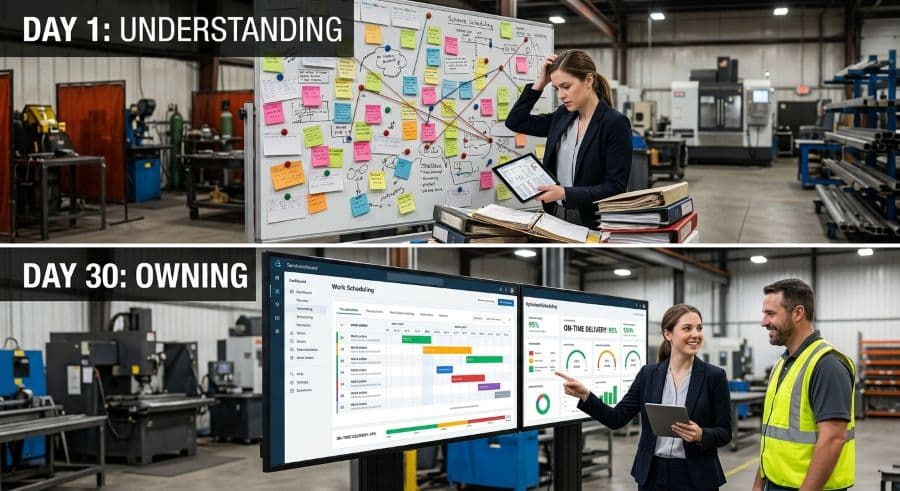
What a new production manager at a job shop actually inherits
The schedule was already running when you walked in. Someone built it, someone has been keeping it alive, and now it's yours, including every workaround, every hot job that jumps the queue because a customer called the owner directly, and every due date that was promised before anyone checked whether the machine was free.
That's the real job in your first month. You're not designing a scheduling system from scratch. You're taking ownership of one that already exists, mostly undocumented, partly in software and partly in someone's head. The mistake most new managers make is trying to fix it in week one. The schedule is load-bearing. Pull the wrong piece and the whole shop feels it by Thursday.
This is a roadmap for the production manager first 30 days: ten days to understand the schedule, ten to stabilize it, ten to make a first improvement stick. By Day 30 you won't have rebuilt anything. You'll understand how the work actually flows, you'll have stopped the most expensive recurring failure, and you'll have one measurable change in motion that the shop can sustain after you stop personally watching it.
Days 1–10: Understand the schedule before you change one thing
Resist the urge to improve anything yet. Your first ten days are for mapping reality, and reality in a job shop is rarely what the official system says it is.
Find the real schedule, not the official one
Most shops run two schedules: the one in the ERP module or the spreadsheet, and the one that actually moves jobs across the floor. The second one often lives with a senior setter, a lead hand, or the owner, and it gets adjusted verbally several times a day. The official version is where due dates are recorded; the real version is where they're decided.
Your job in week one is to find out where the real schedule lives and who edits it. Sit with that person. Watch them work for an afternoon. The questions that matter are simple: When two jobs need the same machine on the same day, who decides which runs first, and on what basis? What makes a job jump the queue? When you can answer those without guessing, you've found the actual scheduling system, which is the thing you were hired to manage.
Walk one job end to end
Pick a single real job and follow it from order entry to shipping. Note every place it waits, every handoff, and every point where someone makes a sequencing decision. A process document tells you how the shop is supposed to work. Walking a job tells you how it actually works, and the gap between the two is where your first month's value lives.
Pay particular attention to the bottleneck. Every job shop has one machine or one cell that gates throughput, and the schedule lives or dies on how well that constraint is managed. If you don't know which resource is the bottleneck by Day 10, you don't yet understand the schedule.
Baseline your numbers before you touch anything
You cannot claim an improvement at Day 30 if you never measured Day 1. Capture a short list of metrics now, while the shop is still running the way it ran before you arrived:
- On-time delivery rate
- Work-in-process job count
- Number of expedites or hot jobs per week
- How often two jobs collide on the same machine
These are the scheduling metrics and KPIs worth baselining before any change. Write the numbers down somewhere you'll find them in three weeks. They're the only evidence you'll have that your first month moved anything, and they're the difference between "I think it's better" and "same-machine conflicts went from six a week to two."
There's a financial reason to take the baseline seriously. Manual and ad hoc scheduling costs a typical job shop 5–10% of revenue in lost capacity, rework, and missed-deadline penalties (Qlector 2025). For a $2 million shop, that's $128,000 to $276,000 a year leaking out through a system nobody fully controls. You won't recover all of it in 30 days. You do need to find out how much of it is happening in your shop, because that number is the case for everything you'll propose later.
If you want the wider context for how job shop scheduling differs from the textbook version, the complete guide to production scheduling for job shops covers the fundamentals this roadmap assumes you're building on.
Days 11–20: Stabilize before you optimize
By now you know where the schedule lives and how work moves. The temptation at Day 11 is to start optimizing. Don't. Stabilize first. Optimization layered on an unstable schedule just produces a more elaborate version of the same chaos, and now it has your name on it.
Stabilizing means three concrete things.
Establish one source of truth
If the real schedule and the official schedule disagree, the shop pays for it every day in confusion. Two competing versions means someone is always working from the wrong one, and the argument about which is correct burns time that should go to running jobs. You don't need new software to fix this in your first month. You need everyone working from the same version, updated on a known cadence, by a known person. Pick the version closest to reality and make it the only one that counts.
Kill the most frequent failure first
Look at your Day 1 baseline. Whatever fails most often, the same machine double-booked, the same customer's jobs always late, the same operator-skill gap stalling a cell, that's where you start. A scheduling conflict that reaches the floor costs $250 to $1,000 per incident in restart time, resequencing, and lost capacity (Product Brief §2). If that's happening twice a week in your shop, the math is easy and the case for fixing it makes itself. Attack the recurring, expensive failure before anything cosmetic. The mechanics of preventing machine scheduling conflicts are worth reading before you change how jobs get assigned to machines.
Make capacity honest
Most unstable schedules are built on infinite-capacity thinking: due dates promised as if every machine were always available. They aren't. A two-shift, Monday-to-Friday operation runs 80 of the 168 hours in a week, which structurally caps how much you can promise before you've scheduled a single job. Add changeovers, maintenance, and the jobs already in progress, and the real available window is smaller still.
Unplanned downtime makes the gap worse. It runs about 35% more expensive than planned downtime (Arda Cards 2026), because it hits without warning and forces a scramble that ripples through every job behind it. A schedule that ignores real available hours isn't a schedule, it's a wish list. Stabilizing means making the calendar reflect the machines you actually have for the hours you actually run them, so the dates you promise are dates the floor can keep.
None of this requires new tooling. A whiteboard kept honest beats a sophisticated system everyone ignores. The point of the stabilize phase isn't to modernize the shop, it's to make the existing schedule trustworthy enough that people stop routing around it. A schedule the floor believes is a schedule the floor follows, and a followed schedule is the precondition for every improvement that comes after. Get the shop to trust the board before you try to make the board smarter.
Days 21–30: Make one improvement stick
Now you improve. But only one thing, and only something you can measure against your Day 1 baseline.
The instinct after three weeks of cataloguing problems is to fix all of them. Resist it. A new production manager who changes ten things at once can't tell which change worked, and the floor can't absorb ten changes at once without breaking. Pick the single improvement with the clearest line to a number you're already tracking.
For most shops, that number is on-time delivery. It's the metric customers actually feel, the one that wins or loses repeat work, and the one most directly tied to scheduling discipline. If your baseline says you're shipping 78% of jobs on time, set a visible target and attack the specific cause your first three weeks exposed, rather than chasing the symptom in general. The tactics for improving on-time delivery in a job shop give you a starting menu to choose from.
Here's what that looks like in practice. Picture a 30-employee contract machining shop running 14 mixed CNC machines, shipping somewhere around four-fifths of its jobs on time. Three weeks of watching the floor showed the late jobs clustering on one five-axis cell that nearly every rush order funneled through. The new manager left the other thirteen machines alone. They set a single rule: nothing gets a promise date on the five-axis cell without checking its real open hours that week, and hot jobs get entered through the same channel as everything else instead of by hallway conversation. On-time delivery is the kind of number that moves when you stop overpromising one constrained resource, not when you reorganize the whole shop. The change was small, measurable, and survived the manager's first week off, which is the only durability test that counts.
Whatever you pick, make the change survive without you. A turnaround that depends on the new manager personally reshuffling the board every morning isn't an improvement, it's a dependency you've created. The real test of a change is whether it still holds the week you're out sick. Build it into a routine: a short daily production meeting, a standard rule for sequencing the bottleneck, a single agreed way to enter a hot job. Routines outlast attention. Heroics don't.
Then measure. Compare the metric you chose against the Day 1 number. If it moved, you have evidence and a repeatable method for the next improvement. If it didn't, you've learned something specific about your shop that no generic playbook would have told you, which is its own kind of progress.
What not to do in your first 30 days
The fastest way to lose the floor's trust is to walk in and rearrange things you don't yet understand. A few specific traps to avoid:
- Don't dismantle the senior person's informal system before you understand why it exists. The verbal schedule living in the lead hand's head is usually a rational response to real constraints. Learn the constraints before you remove the workaround.
- Don't buy software in week one. You can't write a sensible requirements list for a scheduling tool until you know how your shop actually schedules. Diagnose first, then choose. That sequence is the entire point of a structured first month.
- Don't optimize the non-bottleneck. Speeding up a machine that isn't the constraint adds work-in-process and zero throughput. Find the bottleneck, then tune around it.
- Don't promise a turnaround you can't measure. "We'll be more efficient" is not a commitment anyone can hold you to. "We'll cut same-machine conflicts from six a week to two" is. Vague promises are how new managers quietly lose credibility by Day 60.
The 30-day new production manager checklist
If you want the roadmap as a single new production manager checklist, here it is in one place:
Days 1–10 — Understand
- Find where the real schedule lives and who edits it
- Walk one job end to end and note every wait and handoff
- Identify the bottleneck machine and who controls its queue
- Baseline four numbers: on-time delivery, WIP count, expedites per week, conflicts per week
Days 11–20 — Stabilize
- Collapse competing schedule versions into one source of truth
- Fix the single most frequent recurring failure
- Make capacity honest: schedule against real available machine hours
- Set a daily cadence for updating and communicating the schedule
Days 21–30 — Improve
- Pick one measurable improvement tied to a baseline metric
- Attack the specific cause, not the general symptom
- Build the change into a routine that runs without you
- Measure against Day 1 and decide what comes next
Day 30 and beyond
Thirty days in, you haven't transformed the shop, and that was never the goal. You've done something more durable. You understand how the work actually flows, you've stopped the most expensive recurring failure, and you have one measured improvement to build on. That's a foundation you can compound for the rest of your tenure, one improvement at a time, each one measured against the last.
The next phase is where a new production manager job shop role starts to pay off: turning a stabilized, understood schedule into a steadily improving one. When you reach the point where the spreadsheet or the whiteboard is the thing holding you back, rather than the thing keeping you afloat, that's the signal to look at purpose-built scheduling tools. We build drag-and-drop scheduling software for exactly this size of shop, and there's a 14-day trial if you'd rather see finite-capacity scheduling running in your own shop than read about it. No credit card required. Just don't reach for either until your first 30 days have told you what you actually need it to do.
Ready to go beyond the guide?
Most shops are on a live Gantt board within 60 minutes of sign-up, with their existing job list imported from Excel.
Get shop floor scheduling guides in your inbox
Practical articles for production managers — no spam, unsubscribe anytime.
Related articles
How to Handle Rush Orders Without Breaking Your Production Schedule
Every job shop gets rush orders. The ones that handle them without chaos have one thing in common: a live capacity view …
The 5 Production Scheduling KPIs Every Job Shop Should Track
Most job shops track OTD when a customer complains. The shops that consistently hit their due dates track five metrics w…
How to Improve On-Time Delivery in a Job Shop: A Practical 5-Step Guide
On-time delivery starts with knowing — before the customer calls — which jobs are at risk. Here's a 5-step guide to impr…