From Scheduler to Production Manager: How the Schedule Has to Change With the Role
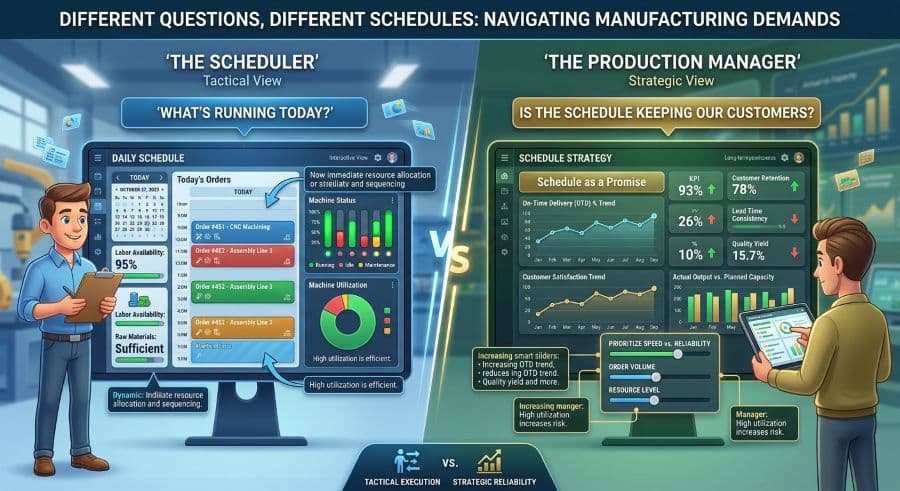
A scheduler asks: what's running today? A production manager asks: is the schedule we're running going to keep our customers? Different questions, different schedule.
The promotion that quietly rewrites your job
When you ran the schedule as a scheduler, your day had a shape. Jobs arrived with due dates, machines had capacity, and your job was to fit one into the other so the floor always had the next thing to run. You got good at it. You knew which operator was fast on the press brake, which machine drifted out of tolerance after lunch, which customer would actually call if their order slipped and which one wouldn't notice.
Then came the production manager promotion, and the schedule stopped being a thing you execute and became a thing you answer for.
That's the part nobody briefs you on. The document on your screen looks identical. The jobs are the same, the machines are the same, the drag-and-drop is the same. But the question you're now being paid to answer has changed underneath it, and a schedule that was excellent for the old question can quietly fail at the new one.
This is about that shift: what the schedule has to become when the job stops being "what runs today" and starts being "will the next ninety days hold."
What actually changes when you move from scheduler to production manager
A scheduler asks one question all day: what's running today, in what order, on which machine? It's a real-time question. You answer it well by knowing the floor — the people, the setups, the quirks of the equipment — and by keeping the next operation queued so nobody stands idle.
A production manager asks a different question: is the schedule we're running going to keep our customers? That's not a real-time question. It's a forward question, and it has money attached to it.
Same schedule. Two completely different uses. The scheduler reads it to decide the next four hours. The production manager reads it to decide whether the shop can take the order the sales rep just promised, whether next month's commitments are realistic, and where the schedule is about to break before it actually does.
Most people who get promoted keep using the schedule the way they always did — as a sequencing tool — and bolt the new responsibilities on as gut feel and Friday-afternoon worry. That works until it doesn't. The shift that separates a good scheduler from a good production manager is learning to treat the schedule as a different kind of object entirely.
The schedule becomes a business document, not a task list
A task list answers "what's next." A business document answers "what are we committed to, what will it cost us, and what's the risk." The same Gantt can be both, but you have to start reading it for the second set of answers.
Manual scheduling is expensive in a way that's invisible from the scheduler's chair and very visible from the manager's. The hidden cost of manual scheduling runs 5–10% of revenue in a typical job shop (Qlector 2025); for a $2M shop, that's $128,000–$276,000 a year once the downstream costs are added in. As a scheduler, that number was somebody else's problem. As a production manager, that number is partly your performance review.
The same is true for the small stuff. A scheduling conflict that reaches the floor — two jobs fighting for the same machine, a setup nobody accounted for — costs $250–$1,000 per incident in restart, resequencing, and lost capacity (Product Brief §2). A scheduler resolves those incidents. A production manager is measured on how many of them happen in the first place.
Reading the schedule as a business document means asking, before you commit to anything: what does this promise cost if it's wrong, and what's the probability it's wrong? That's a question a task list can't answer. You need a schedule you can see far enough ahead in to spot the trouble while it's still cheap to fix.
You start scheduling for commitments, not for today
The single biggest change in the scheduling skills a production manager needs is the move from sequencing to commitment management.
A scheduler protects the next shift. A production manager protects the due dates — all of them, across every job on the floor, including the ones that don't run for three weeks. When sales wants to quote a four-week lead time, you're the person who has to know whether the schedule can actually absorb that job without pushing three existing customers late. That's not a "what's running today" question. It's a "what happens to everything else if I say yes" question.
This is where on-time delivery becomes the number you live and die by. As a scheduler, late was a fire to fight. As a production manager, on-time-delivery percentage is the headline metric your customers grade you on and the one that decides whether they reorder. A schedule optimized to keep machines busy is not the same as a schedule optimized to keep promises, and learning to tell the difference is most of the job.
Practically, that means you stop scheduling to fill capacity and start scheduling to protect commitments. Sometimes those agree. Often they don't — the job that keeps the machine busy this afternoon is the one that quietly eats the buffer the late-but-important customer needed next week.
Capacity stops being a wall you hit and becomes a number you manage
To a scheduler, capacity is a constraint you discover in real time: the machine is full, so the job waits. To a production manager, capacity is a number you're supposed to know before you commit, and ideally before sales does.
The math is simple enough that you can check it yourself, which is exactly why a manager should. A two-shift, Monday-to-Friday operation runs 80 of the 168 hours in a week, which structurally caps calendar utilization below 50% before a single machine breaks down or a setup runs long. That ceiling isn't a failure — it's the real shape of your week, and every realistic commitment has to fit inside it. The scheduler can ignore it because they're only looking at today. The manager can't, because they're quoting next month.
This is also where preventing scheduling conflicts before they reach the floor stops being a nice-to-have and becomes a budget line. Every conflict that surfaces on the floor is capacity you've already lost. Catching it on the schedule — while it's still pixels and not a stopped machine — is the difference between a manager who reacts and one who plans. And unplanned interruptions cost more than planned ones: unplanned downtime runs 35% more expensive than planned downtime (Arda Cards 2026), which is a direct argument for seeing capacity problems early enough to plan around them.
A schedule that shows you capacity as a forward number — not a wall you discover when a job stalls — is the tool that makes this shift possible. Without forward visibility, a production manager is just a scheduler with a bigger title and the same blind spots.
The metrics change with the chair
Part of the scheduler role evolution into management is that the questions you're judged on stop being operational and start being financial-adjacent.
A scheduler's metrics are immediate: is the floor running, is the queue full, did today's jobs go out. A production manager's metrics are aggregate and trend-based: on-time delivery, throughput, utilization, and the cost of the schedule itself. You move from "is it running" to "are we on time and are we profitable."
If you've tracked Overall Equipment Effectiveness (OEE) before, you know the world-class benchmark is 85% (Nakajima/TPM literature), and the formula is Availability × Performance × Quality. As a manager, your job isn't to chase a textbook number — it's to know which of those three factors your shop actually loses ground on, and to read the schedule for the pattern. Is it availability (machines down, setups long)? Performance (running slow)? Quality (rework eating capacity twice)? The schedule, read as a business document, tells you which one.
Knowing which scheduling metrics and KPIs actually matter for a job shop — and which are vanity numbers that look productive without protecting a single due date — is one of the first things to get straight in the new role. Tracking everything is a way of tracking nothing. Pick the two or three numbers that map to customer promises and watch those.
What the scheduler in you should never unlearn
Here's the part the management books get wrong: the promotion is not an invitation to leave the floor behind.
The best production managers keep the scheduler's instincts — the tacit knowledge of which operator, which machine, which customer — and add the forward view on top. The shop-floor knowledge that made you a good scheduler is exactly what keeps your forward planning honest. A schedule that looks feasible on paper but ignores the half-hour setup nobody documented is a schedule that will make you a liar to a customer.
So the scheduling skills a production manager actually needs are additive, not a replacement. Keep the floor instinct. Keep knowing the quirks. Then layer on the commitment view, the capacity math, and the metrics that map to revenue. The danger isn't keeping the old skills — it's getting trapped in them, staying the best scheduler in the building and never becoming the manager the shop hired you to be.
The shops that struggle after a promotion usually have a manager doing the scheduler's job beautifully and the manager's job not at all.
The shift, and your first move
The move from scheduler to production manager is a change in what the schedule is for. It goes from a task list that answers "what's next" to a business document that answers "what are we committed to, what does it cost, and where's the risk." Sequencing becomes commitment management. Capacity becomes a number you manage forward instead of a wall you hit. And the metrics stop being "is it running" and become "are we on time and profitable."
None of that requires new software to understand. It requires a new way of reading the schedule you already have — which is the harder change, and the more important one.
If you're early in the transition, the most useful next step is a clear-eyed look at what the first thirty days as a new production manager should actually focus on, because the order you tackle this shift in matters as much as the shift itself.
And if you find that your current schedule — the spreadsheet, the whiteboard, the ERP module that fights you — can't show you capacity and commitments far enough ahead to manage them, that's worth fixing. We build scheduling tools for exactly this gap; you can see what's available when the tool you inherited stops keeping up with the role you grew into. If you'd rather just try a visual scheduler against your own jobs, the free 14-day trial is there when you're ready — no rush, and no credit card.
Ready to go beyond the guide?
Most shops are on a live Gantt board within 60 minutes of sign-up, with their existing job list imported from Excel.
Get shop floor scheduling guides in your inbox
Practical articles for production managers — no spam, unsubscribe anytime.
Related articles
How to Handle Rush Orders Without Breaking Your Production Schedule
Every job shop gets rush orders. The ones that handle them without chaos have one thing in common: a live capacity view …
The 5 Production Scheduling KPIs Every Job Shop Should Track
Most job shops track OTD when a customer complains. The shops that consistently hit their due dates track five metrics w…
How to Improve On-Time Delivery in a Job Shop: A Practical 5-Step Guide
On-time delivery starts with knowing — before the customer calls — which jobs are at risk. Here's a 5-step guide to impr…