Introducing Scheduling Software to a Skeptical Shop Floor: A Change Management Playbook
Most scheduling software rollouts don't fail because of the software. They fail because the shop floor never bought in. Here's how to avoid that outcome.
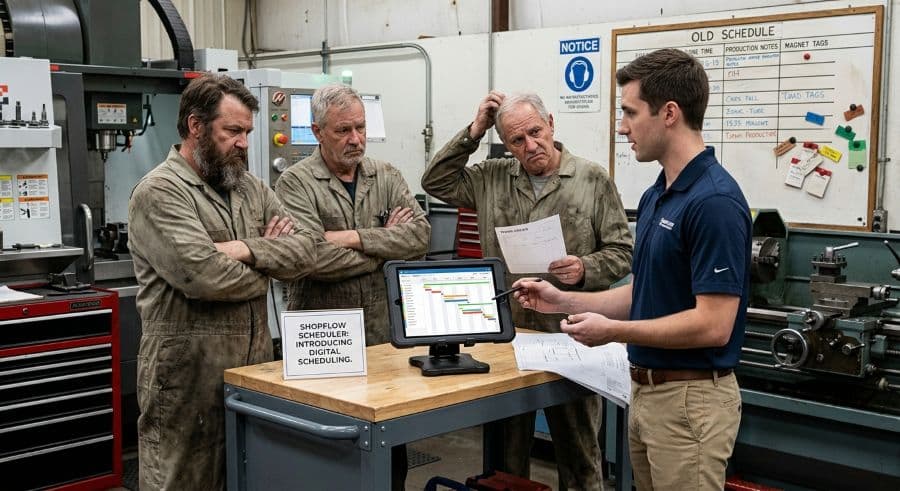
A whiteboard never crashed during a production meeting
Your best setup guy has run the scheduling whiteboard for eleven years. He can read the whole shop from across the room — what's running, what's queued, what's late. When a hot job comes in, he wipes a magnet and moves it in three seconds. No login, no sync, no spinning wheel. Then you tell him the board is going away and he's getting software, and he stops making eye contact.
That reaction is not stubbornness. It's a rational response from someone who has watched the board work every day and has no reason yet to believe a screen will work better. A scheduling conflict that reaches the floor costs $250–$1,000 per incident in machine restarts, resequencing, and lost capacity (Product Brief §2), and the person at the whiteboard is the reason most of those never happen. He is protecting the thing that protects the shop.
Most scheduling software rollouts don't fail because the software is bad. They fail because the floor never bought in. The license gets paid for, the schedule stays on the whiteboard, and a few months later someone quietly cancels the subscription. This is a playbook for the other outcome: getting a skeptical shop floor to actually run the new system, on purpose, without a mandate that breeds resentment.
The rollout fails on adoption, not features
You evaluated scheduling software on features — finite capacity, a drag-and-drop Gantt, due-date alerts. Those matter for the buying decision. They have almost nothing to do with whether the tool survives contact with the floor.
The floor doesn't evaluate software. It evaluates change. The part of a rollout that actually decides the outcome is change management — the work of getting people to trade a tool they trust for one they don't yet. Change management for scheduling software is a different project from the feature comparison that got you to sign the contract, and it's the one most shops skip. You can buy the best tool on the market and still end up back at the whiteboard if you treat adoption as something that happens automatically the moment the license goes active.
There's a reliable tell for this failure mode. If the schedule lives in two places — the screen and the board — for more than a few weeks, the board is winning. People keep the system they trust running underneath the one they were told to use, and the official tool slowly becomes a reporting chore instead of the source of truth. The whole game is collapsing those two systems into one, and getting the floor to choose the screen as the one that stays.
The whiteboard isn't the enemy. It's the incumbent you have to beat fairly.
Before you can replace the whiteboard, you have to respect why it won in the first place. It's visible to everyone at once — no one needs to be granted access to look at it. It has zero latency. It has no permissions, no version, and no password. When it fails, it fails gracefully: a smudge, not a crash. And everyone on the floor already knows how to read it without training.
Those are real strengths, and a screen does not automatically beat them. A new tool earns its place by winning on the dimensions the floor values, not only the ones management values. Management cares about capacity math, due-date reliability, and reporting. The floor cares about whether it can see the schedule from the machine, change it fast when reality changes, and trust that what it shows is true. If your rollout only sells the first list, you'll lose the second one — and the second list is the one standing next to the machines.
This is worth being honest about before you start, including with yourself. The honest tradeoffs between a whiteboard and scheduling software are real: the board genuinely is faster for a five-machine shop on a quiet week. Software wins as job count, machine count, and change frequency climb — when the board stops fitting on the wall and a single late reschedule ripples through six downstream jobs nobody can see. Sell the win where it actually exists, and the floor will catch you in any place you oversell.
The change management playbook: six moves that earn floor buy-in
We spent a year embedded in a pressure-sensitive label manufacturer while building production scheduling software for them. The adoption fight there had almost nothing to do with the algorithm and almost everything to do with whether the people who actually scheduled the presses trusted what the screen told them. The moves below come from that engagement and from watching the same pattern repeat across the job shop space.
1. Surface the real objection before you demo anything
The objection is rarely "I don't like software." It's usually one of three specific fears: this will be used to track me, this will be slower than what I do now, or the office will schedule the shop without understanding the shop. You cannot answer a fear you haven't named. Sit down with the people who run the current schedule and ask, plainly, what they think this is going to cost them. Write down the answers in their words, not yours. The veteran who says "this'll be one more thing to update when a job changes" is telling you the tool has to be faster than a magnet, not just smarter than one. The one who says "the office is going to schedule jobs they've never set up" is telling you the floor needs a way to push back before a bad sequence reaches a machine. Every later move in this list is aimed at one of those three fears, and if you skip this step you'll spend your rollout solving problems nobody actually had while the real objection sits untouched.
2. Recruit the skeptic, not the enthusiast
The instinct is to pick the most software-friendly person as your first user. That's a mistake. The enthusiast convinces no one — the floor assumes they were always going to like it. The person whose opinion moves the room is the respected veteran the others watch. If you can get the eleven-year whiteboard veteran to grudgingly admit the screen saved him a step, you've done more than any demo. Give that person real input into the setup, not a finished system to rubber-stamp. The fastest way to lose a skeptic is to make them feel handled.
3. Run both systems in parallel — don't rip the board down on day one
Pulling the whiteboard off the wall on go-live day is the single most common self-inflicted wound in a scheduling rollout. It removes the floor's safety net and the new tool's credibility in the same move, so the first time the software is confusing, there's nothing to fall back on except resentment. Run the two side by side for two to three weeks. Let the floor check the screen against the board they trust and watch them agree. The board doesn't come down because you took it down — it comes down when the floor stops looking at it, which is a decision they make, not one you announce.
4. Migrate the data with the floor, not for them
Whoever builds the starting schedule owns it. If the office imports the data alone and hands the floor a finished system, the floor treats it as the office's schedule and looks for reasons it's wrong. Bring the people who run the schedule into the migration. A clean CSV import of your existing production schedule means you can start from the real job list the floor already recognizes — the same routings, the same machine names, the same shorthand — instead of a sanitized version someone retyped from memory. When the floor sees their own data come across intact, the screen stops being an outside system and starts being theirs.
5. Make schedule changes as visible as the board made them
The whiteboard's quiet superpower is that a change is public. Move a magnet and everyone within sight knows the plan shifted. A lot of software loses that — the schedule changes silently in a database and the floor finds out when a job shows up they didn't expect. That single gap will send people back to the board faster than any missing feature, because invisible changes break the trust the board never broke. Decide deliberately how a reschedule gets communicated, on screen and to the people downstream of it. The discipline of communicating schedule changes to machinists and customers is what keeps the new system feeling as honest as the old one. If a change happens and nobody on the floor knows, the tool has failed at the one job the whiteboard did best.
6. Report one number the floor actually cares about
Management will want utilization, on-time delivery, and capacity reports out of the new tool. Fine — but pick at least one number that pays the floor back, not just the office. A machinist who watches their setups get sequenced so they're not waiting on a fixture, or who can finally see that a machine sat idle because of a missing material and not because of them, has a reason to keep the screen alive. Use a machine utilization rate calculation the floor can verify against what they lived through that week, so the number reads as true rather than as something the office made up to grade them. A metric the floor trusts is an ally. A metric they think is being used against them is the fastest route back to the whiteboard.
Four ways managers re-trigger resistance
Even a good rollout can be undone by reflex. These are the moves that reopen the fears you worked to close.
- Leading with surveillance. The first sentence out of your mouth about the new tool decides how the floor hears everything after it. "Now I can see who's behind" reframes the whole project as monitoring. "Now you can see the whole shop without walking the floor" reframes it as a tool that serves them. Same software, opposite reception.
- Mandating before proving. A mandate works once you've earned it and backfires before you have. If the only reason to use the system is that you said so, the floor will comply on paper and route around it in practice.
- Letting the office override the floor silently. The moment someone in the office reschedules the shop without talking to the shop, you've confirmed the third fear from move one. Changes that affect the floor get made with the floor in the loop, or the floor stops believing the screen.
- Treating go-live as the finish line. Adoption is decided in the four to six weeks after launch, not on launch day. Plan for that window. Be on the floor, fix the small annoyances fast, and the system becomes habit. Disappear after go-live and the whiteboard quietly comes back.
Buy-in is the last mile, and it's the one you control
You can't control how good the market's scheduling tools are. You can control whether your shop adopts the one you chose, and that's where the rollout is actually won or lost. The features got you to sign. The change management is what gets the screen running next to the machines six months from now instead of gathering dust while the board fills back up. Surface the real fear, recruit the skeptic, run parallel, migrate the data together, keep changes visible, and report a number the floor trusts — in that order — and you give a skeptical floor honest reasons to choose the new system instead of a mandate to resent.
The most reliable way to find out whether a tool can survive your floor is to put it in front of your floor. Start a free trial — no credit card, 14 days — import last week's real job list, and run it in parallel against your whiteboard for a few days. Let the people who run the schedule tell you whether the screen earns its place. If you're earlier than that and just want to tighten up your current process first, the templates and trackers in the store are a low-stakes way to start before you change anything on the wall.
Ready to go beyond the guide?
Most shops are on a live Gantt board within 60 minutes of sign-up, with their existing job list imported from Excel.
Get shop floor scheduling guides in your inbox
Practical articles for production managers — no spam, unsubscribe anytime.
Related articles
Whiteboard vs. Scheduling Software: When You've Outgrown the Magnets
There's nothing wrong with a whiteboard — until there is. The point where your magnetic tag system stops working is spec…
Production Scheduling Software for Job Shops in 2026: A Buyer's Guide
The production scheduling software market spans four distinct tiers — from free spreadsheets to $50,000/yr enterprise AP…
Why Excel Scheduling Breaks Down After 20 Jobs (And What to Do Instead)
Excel can handle 5 to 20 jobs in a job shop. Past that, it becomes a liability. Here's why it breaks and what the altern…