Why Excel Scheduling Breaks Down After 20 Jobs (And What to Do Instead)
Excel can handle 5 to 20 jobs in a job shop. Past that, it becomes a liability. Here's why it breaks and what the alternatives look like.
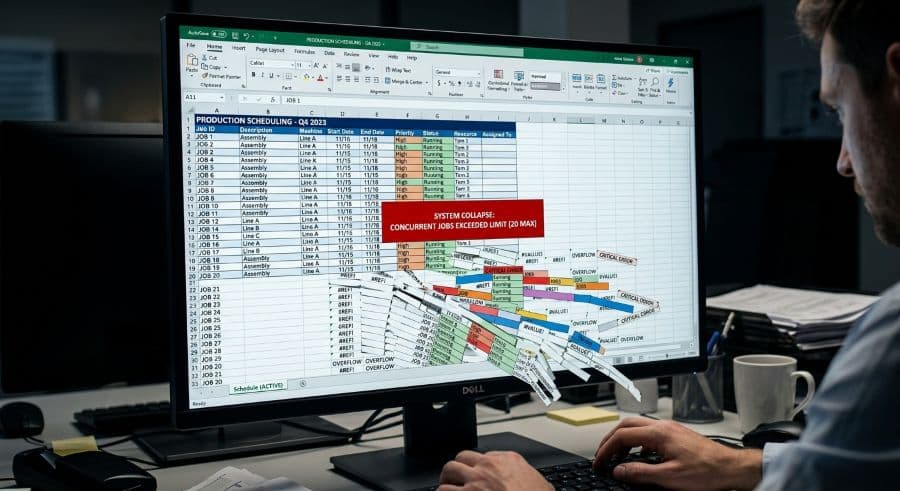
The spreadsheet everyone trusted at 12 jobs
There's a specific moment most job shops can name. The scheduling spreadsheet that ran the floor for two years — color-coded, dialed in, the file everyone opened first thing Monday — stops being the source of truth. Nobody decides this. It just happens. One day the floor supervisor keeps a printout with handwritten corrections because the master file is wrong by 10 AM. The estimator runs a private copy to quote lead times. Two people argue about which version is current.
The spreadsheet didn't crash. Excel almost never crashes. What broke is trust, and it broke quietly, somewhere between 15 and 30 active jobs depending on how your shop runs.
This is one of the most common scheduling questions we hear from SMB manufacturers: the spreadsheet works, until it doesn't, and the failure is hard to see coming because nothing actually errors out. This article explains exactly what breaks, why the threshold lands where it does, what it costs you while you keep limping along, and the three honest paths to an excel production scheduling alternative — including the one that isn't software at all.
The spreadsheet isn't the problem, until the math turns against you
Start with the uncomfortable truth for anyone selling scheduling software: Excel is a genuinely good tool for scheduling a small shop. It's free, you already own it, everyone on the floor can read a grid, and it bends to whatever weird routing your shop actually uses instead of forcing you into someone else's data model. A shop running five to twenty concurrent jobs across a handful of machines can schedule perfectly well in a spreadsheet, and plenty do for years. If that's you, the honest advice is to keep your spreadsheet and make it better, not to buy something.
The reason Excel eventually fails isn't that it's primitive. It's that a spreadsheet is a record of decisions, not a model of constraints.
When you type a job into a cell, Excel stores exactly what you typed. It does not know that machine 4 can only run one job at a time. It does not know that the heat-treat step can't start until the CNC step finishes. It does not know that you've now booked 58 hours of work into a 40-hour week on your only Swiss lathe. It will let you do all of that, cheerfully, and show you a tidy grid that looks like a plan.
At low job counts none of that matters, because the constraints live in your head. You know machine 4 is double-booked Tuesday because you can hold the whole shop in working memory. The spreadsheet is just where you write down what you already worked out. The breakdown comes when the shop outgrows the one place those constraints are actually being checked: a human brain.
It's worth doing the capacity math by hand once, because it grounds the rest. A two-shift, Monday-to-Friday operation runs 80 of the 168 hours in a week, which structurally caps how much real capacity any single machine has before you've scheduled a single job. Every hour you book past that 80 isn't aggressive scheduling — it's a promise the calendar can't keep. A spreadsheet will let you write the promise anyway, and it won't tell you which jobs are sitting on top of capacity that doesn't exist.
What actually breaks past 20 concurrent jobs
The "20 jobs" line isn't a hard number — it's the point where, for a typical job shop, three specific failures stop being occasional annoyances and become daily ones. The exact threshold depends on your machine count and routing complexity. The failures themselves are always the same three.
Excel has no finite capacity
Finite capacity scheduling means the schedule refuses to load a resource beyond what it can actually do. Excel has no concept of it. A cell holds text; it doesn't hold the fact that a machine has 40 hours in a week and you've assigned 58. So overloads don't announce themselves. They surface on the floor when a machine that was "scheduled" for three jobs physically runs one of them late, and the other two cascade. Every promised date downstream of that machine was fiction the moment you overbooked it, but the spreadsheet showed green.
Excel has no conflict detection
Nothing in a spreadsheet flags when two jobs claim the same spindle at the same time, or when a downstream operation is scheduled before the upstream one it depends on. You can build conditional formatting that turns a cell red under some conditions, but that catches a value you anticipated, not a scheduling conflict you didn't. So conflicts get discovered the expensive way — on the floor, mid-shift, when an operator goes to load a job and the machine is already running something else.
That discovery has a price. A scheduling conflict that reaches the floor costs $250 to $1,000 per incident in machine restarts, resequencing, and lost capacity (Product Brief §2). One a week is not unusual once a shop is past its spreadsheet's real ceiling, and each one is a tax you pay specifically because the conflict surfaced late instead of being caught when the schedule was built.
Excel makes every change a manual recalculation
This is the one that compounds. Move a single job earlier and every downstream date that depended on it is now wrong, and stays wrong until a human re-types each one. In a small schedule that's a minute of cleanup. The trouble is that the work doesn't scale with the number of jobs — it scales with the number of relationships between jobs.
Five jobs sharing machines and routings produce ten possible pairings to keep straight. Twenty jobs produce 190. You didn't add four times the jobs and four times the work; you added four times the jobs and nineteen times the bookkeeping. That gap between how the job count grows and how the dependency count grows is the real reason spreadsheets feel fine right up until they feel impossible. It's also why these excel gantt scheduling limits can't be fixed by being more careful or more disciplined. The arithmetic is working against the operator, not the operator's habits.
The cost of a spreadsheet that "still works"
The dangerous thing about the Excel ceiling is that you cross it without a single dramatic failure. There's no outage, no error message, no day the schedule stops opening. The cost is real but distributed — a few hours of overtime here, an expedited freight charge there, a due date missed by a day that you smoothed over with a phone call. None of it shows up as a line item called "bad scheduling," so it's easy to conclude the spreadsheet is fine.
It adds up to more than most owners expect. Manual scheduling inefficiency costs a typical job shop 5 to 10 percent of revenue once you account for the full picture — overtime, expedites, idle capacity, and missed-date recovery (Qlector 2025). For a $2M shop, that's $128,000 to $276,000 a year. That number doesn't require a software failure to accumulate. It accumulates precisely while everything looks like it's working.
There's a second-order cost too. When a conflict forces an unplanned machine stoppage, that downtime runs about 35 percent more expensive than downtime you planned for (Arda Cards 2026), because you're paying for the scramble — the resequencing, the setup you already broke down, the operator standing idle while someone sorts out what runs next. A spreadsheet that can't prevent the conflict is, by definition, manufacturing the more expensive kind of downtime.
An Excel production scheduling template buys you time, not capacity
The first honest fix is to stop running a spreadsheet you built ad hoc and start running one that was actually designed for scheduling. A real excel production scheduling template — locked formulas, input validation, a proper Gantt view driven off your job and machine data, a clean separation between data and presentation — genuinely extends your runway. It pushes the breakdown point further out. It kills the typo-driven errors. It gives the whole floor one consistent visual instead of five personal interpretations of the same grid.
That's a meaningful upgrade, and for a shop that's organized but still under the threshold, it may be all you need this year.
It is also still Excel underneath, and it's worth being precise about what a template cannot do, because no template can. It still has no finite capacity check — a well-built template will warn you about an overload you formula'd for, but it won't stop you the way a constraint-based scheduler does. It has no live conflict detection across the whole schedule. And it has no drag-and-drop that recalculates every downstream date the instant you move a job. A template raises the ceiling. It does not remove it. If your shop is already past the point where dependencies outrun your ability to track them by hand, a better spreadsheet buys you months, not a permanent fix.
What a real excel production scheduling alternative looks like
When the spreadsheet — even a good one — stops keeping up, there are three honest directions to go, and the right one depends entirely on where your shop actually is.
Stay in the spreadsheet, but upgrade it. If you're reliably under about twenty concurrent jobs and not ready to put scheduling software in front of your floor, a purpose-built template is the lowest-friction move. You keep the tool everyone knows and remove most of the self-inflicted errors. This is the right call more often than software vendors like to admit.
Move to a purpose-built visual scheduler. This is the category that exists specifically to fix the three failures above. A drag-and-drop scheduling tool models machines as finite resources, so it refuses to overload them; detects conflicts at the moment you create them instead of on the floor; and recalculates every dependent date automatically when you move a job. The whole point of this kind of purpose-built scheduling tool over a spreadsheet or whiteboard is that the constraints live in the software instead of in one person's head — which is the exact thing that broke when your shop grew. For a deeper look at what to evaluate, the production scheduling software guide for job shops walks through the decision criteria.
Adopt an ERP scheduling module. If scheduling is only one of several things you're trying to fix — and you also need job costing, purchasing, inventory, and quoting in one system — an ERP with a scheduling module can make sense. The tradeoff is weight: ERP implementations are longer, costlier, and scheduling is usually a secondary module rather than the core of the product. For many SMB shops that just need the schedule fixed, a full ERP is overkill for the scheduling problem, and the implementation outlasts the patience that drove the search in the first place. It's the right tool when scheduling is genuinely one item on a much longer list.
The mistake isn't picking the wrong one of these. The mistake is assuming you have to jump straight from a spreadsheet to a full ERP, when the gap between them is exactly where a purpose-built scheduler lives.
How to tell you've already crossed the line
You don't need a study to know your spreadsheet has hit its ceiling. The signals are specific and you'll recognize them:
- Shadow copies exist. More than one version of the schedule is in active use, and people quietly trust theirs over the master.
- You re-type dates after every change. Moving one job means manually fixing a string of downstream dates, and you brace for it.
- You find conflicts on the floor, not in the file. Double-bookings and capacity overloads surface when an operator hits them, not when you build the schedule.
- You've stopped trusting the master. The floor supervisor keeps a printout with corrections because the file is wrong within hours.
- Promising a due date feels like a guess. A customer asks for Tuesday and you genuinely don't know whether the shop can keep that promise without checking three places by hand.
Two or three of these means you're at the edge. Four or five means you crossed it a while ago and have been paying the distributed cost without naming it.
Where to go from here
Excel earns its place in a small shop, and the goal here isn't to talk you out of a tool that's working. It's to help you see the line before it costs you a customer — the point where the dependencies you're tracking by hand outgrow the one place they're being checked.
If you're still under the threshold, or you want to clean up the spreadsheet before you decide anything bigger, start with a schedule built for the job. Our Production Scheduling Gantt Template is a locked, validated Excel workbook with a real Gantt view for $27 — enough structure to push your breakdown point out and kill the typo errors, with no commitment to new software. It's the honest first step for a shop that isn't ready to switch.
If you already recognized four of those five warning signs, the spreadsheet isn't your bottleneck to remove next year — it's the one removing capacity right now. That's the case for a scheduler that enforces finite capacity, catches conflicts as you build, and recalculates the whole plan when you drag one job. You can see what that costs or start a free trial and load your own jobs into it — no credit card, 14-day trial. Either way, the next step in your scheduling decision is the same: figure out which side of the line your shop is actually on, and stop pretending the spreadsheet is still telling you the truth.
Ready to go beyond the guide?
Most shops are on a live Gantt board within 60 minutes of sign-up, with their existing job list imported from Excel.
Get shop floor scheduling guides in your inbox
Practical articles for production managers — no spam, unsubscribe anytime.
Related articles
Whiteboard vs. Scheduling Software: When You've Outgrown the Magnets
There's nothing wrong with a whiteboard — until there is. The point where your magnetic tag system stops working is spec…
Production Scheduling Software for Job Shops in 2026: A Buyer's Guide
The production scheduling software market spans four distinct tiers — from free spreadsheets to $50,000/yr enterprise AP…
When ERP Is Overkill: Scheduling-Only Tools for Small Job Shops
ERPs are powerful — but expensive, slow to implement, and bundle dozens of modules you may not need. If scheduling is yo…