When ERP Is Overkill: Scheduling-Only Tools for Small Job Shops
ERPs are powerful — but expensive, slow to implement, and bundle dozens of modules you may not need. If scheduling is your primary problem, here's how to think about it.
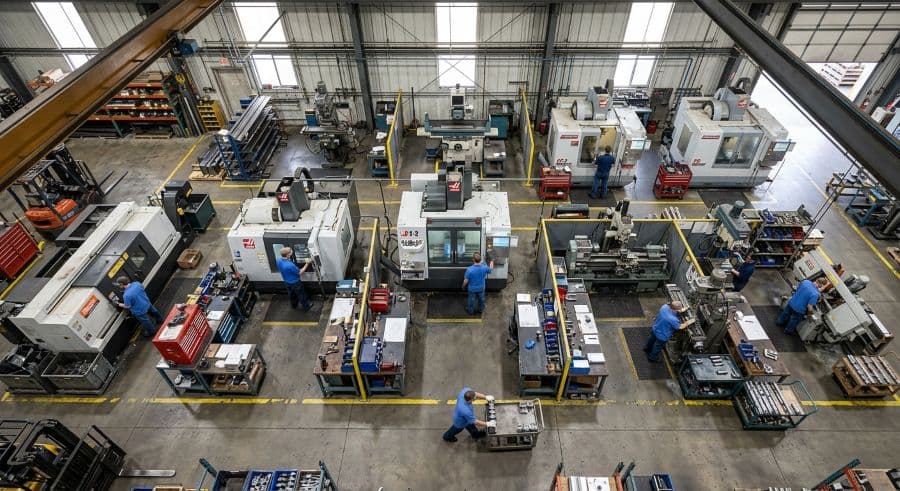
The quote was for an ERP. The problem was a double-booked press brake.
A shop owner reaches out because his press brake keeps getting promised to two jobs at once. Twice a week, someone walks a hot order to the floor and finds the machine already running something else. He wants that to stop.
The first vendor he calls quotes him a full job shop ERP: per-user licensing, a five-figure implementation engagement, and a rollout measured in months. Quoting, inventory, purchasing, job costing, accounts payable — all of it, bundled. Scheduling is in there somewhere, a tab inside a system he'd spend a quarter learning to use.
He didn't have an inventory problem. He didn't have a quoting problem. He had a scheduling problem, and he was being sold a manufacturing operating system to fix it.
This is the most common mismatch in shop-floor software buying. ERPs are real tools that solve real problems. But they're scoped for shops that need to run everything through one system, and a lot of small job shops don't — they need to fix the schedule and leave the rest alone. This article lays out a factual way to tell the difference: when a full ERP earns its price, when scheduling software for a small job shop is the right call instead, and how the four systems shops evaluate most actually compare on price, dependencies, and time to value.
What an ERP actually bundles — and why scheduling is just one module
An ERP is not a scheduling tool. It's a system of record for the whole business, and scheduling is one module among many.
A full job shop ERP like JobBOSS² (ECI) is built to run quoting, job costing, purchasing, inventory, shipping, and accounting in one connected database, with scheduling included as a secondary module (top10erp.org, verified 2026). E2 ShopTech (ECI) — owned by the same parent company — is the same shape: an established job shop ERP with broad modules and scheduling as one secondary feature inside the larger platform. The value proposition is breadth. Every transaction in the shop lives in one place, and the modules talk to each other.
The cloud MRP systems sit in an adjacent category. Katana MRP is an inventory-first cloud MRP that serves apparel, food and beverage, and e-commerce SMB manufacturers, with Shopify and QuickBooks integrations; its scheduling and capacity views are a secondary module, not the core product (katanamrp.com/pricing, verified May 2026). MRPeasy is a cloud MRP for growing manufacturers who want the full MRP picture — including CRM and procurement — rather than a scheduling-first tool (mrpeasy.com/pricing, verified 2026).
All four are legitimate. None of them is primarily a scheduler. In every one, the Gantt or capacity view is a feature inside a system whose center of gravity is somewhere else — inventory, in the MRP cases; the full quote-to-cash cycle, in the ERP cases. That's the thing to internalize before you compare prices: when you buy one of these to solve a scheduling problem, you're buying a whole platform and using one corner of it.
That can be exactly right. It can also be a lot of system to carry for a problem that lives entirely on the shop floor.
The cost gap when scheduling is your only problem
The reason this decision matters is that the bundled approach and the standalone approach are not priced anywhere near each other — and the gap is widest precisely for the small shop with a narrow problem.
Here's how the systems compare on the attributes you can actually verify:
| Tool | What it is | Starting price | Pricing model | Scheduling's role | Setup |
|---|---|---|---|---|---|
| JobBOSS² (ECI) | Full job shop ERP | From $200/user/mo; implementation typically starts at $5,000 | Per user | Secondary module | Consultant-led implementation |
| E2 ShopTech (ECI) | Job shop ERP (ECI-owned) | ~$300–$600/mo (estimate — not publicly published) | Quote-based | Secondary module | Consultant-led onboarding |
| Katana MRP | Inventory-first cloud MRP | Core Plan from $299/mo; modules add $199–$999/mo | Tiered + add-on modules | Secondary module | Self-serve, inventory-first |
| MRPeasy | Cloud MRP | $49–$99 per user per month | Per user | Module within MRP | Self-serve MRP setup |
| Visual Machine Scheduler | Standalone visual scheduler | From $199/mo (Essentials) | Flat tier, seats and machines included | The entire product | Drag-and-drop, running the same day |
Sources: JobBOSS² (top10erp.org, verified 2026); Katana (katanamrp.com/pricing, verified May 2026); MRPeasy (mrpeasy.com/pricing, verified 2026); Visual Machine Scheduler tiers per Rovaryn Product Brief. E2 ShopTech pricing is an estimate; ECI does not publish E2 pricing publicly.
Two things stand out. First, the per-user ERP and MRP models scale with headcount, so the sticker price grows as you add the people who'd actually use the schedule. Second, the ERP figures don't include the implementation engagement — JobBOSS²'s starts around $5,000 (top10erp.org, verified 2026) before anyone schedules a single job.
Now weigh that against what scheduling problems actually cost. Manual scheduling — Excel, whiteboards, the dispatcher's memory — quietly bleeds 5–10% of revenue in a typical job shop (Qlector 2025), which works out to roughly $128,000–$276,000 a year for a $2M shop once the related costs are tallied. A single scheduling conflict that reaches the floor — the double-booked press brake — costs $250–$1,000 per incident in machine restarts, resequencing, and lost capacity (Product Brief §2).
Run the arithmetic the way an owner would. One prevented conflict, at $250–$1,000, covers a full month of standalone scheduling software for a small job shop at the $199 entry tier. You don't need the tool to transform the business. You need it to stop being wrong about which machine is free.
Stretch the same comparison across a year and the gap is hard to ignore. The standalone tool at the entry tier runs $2,388 annually before any discount. A per-user ERP at $200 per seat per month reaches that figure with a single user inside the first month, then keeps climbing with every seat you add — plus the roughly $5,000 implementation floor before the system schedules anything (top10erp.org, verified 2026). For a shop whose only real problem is the schedule, that's a large multiple of spend to fix a problem the cheaper tool already covers.
When a full ERP is the right call
Sometimes it is. The honest version of this article has to say so plainly, because the ERP isn't expensive for no reason — it's expensive because it does a lot, and some shops need all of it.
Buy the full platform when your problems are genuinely cross-functional. If a late job is usually a materials problem — you can't schedule the run because the steel isn't in and the PO is floating somewhere in email — then a scheduler alone won't fix it, and an ERP that ties purchasing, inventory, and the schedule into one record will. If you're quoting dozens of jobs a week and need quoted-versus-actual job costing to survive, that lives in the ERP. If you have ITAR, AS9100, or audit-trail requirements that demand a single system of record across quoting, production, and shipping, the integrated platform is doing real work that a point tool can't.
The pattern is simple: an ERP earns its price when the connections between functions are the problem. Inventory feeding scheduling feeding job costing feeding invoicing, all needing to reconcile — that's what these systems are for, and a standalone scheduler will leave you stitching it together by hand.
If that's your shop, the implementation cost and the per-user pricing aren't overkill. They're the price of running the whole operation through one database, and it's worth paying.
When scheduling software for a small job shop is the right call
The other shop is just as common, and it's the one that gets oversold.
You already have accounting handled — QuickBooks, or a bookkeeper, or an existing system that works fine. Quoting happens in a spreadsheet or a tool you don't hate. Inventory is simple enough that you're not drowning in it. Your actual bleeding wound is the schedule: machines double-booked, due dates missed because nobody saw the conflict coming, and no shared picture of what's running where. Every person on the floor has a slightly different version of the plan in their head.
That's a scheduling problem, and scheduling without ERP is the faster, cheaper fix. What you want is standalone production scheduling — a tool whose entire job is the schedule and nothing else:
- A drag-and-drop Gantt board with machines as rows and jobs as blocks, so the plan is visible to everyone instead of living in one person's memory.
- Finite-capacity logic that knows a machine can only run one thing at a time, so the double-booking gets caught when you create it, not when it reaches the floor.
- Conflict detection across machines — and, at higher tiers, across operators — so an over-promised resource surfaces immediately.
- No dependency on a larger ERP, no module you're not using, no consultant engagement to turn it on.
Picture the shop concretely. A 22-employee contract machining outfit in Ohio runs 14 machines and somewhere north of 30 concurrent jobs in a busy month. Accounting is in QuickBooks and nobody's complaining about it. Quotes go out of a spreadsheet the owner has used for a decade. The one thing that genuinely hurts is the schedule: two missed due dates a week, a setup guy who routinely finds his next machine already mid-run, and a Monday-morning ritual of redrawing the whiteboard from scratch. That shop has no ERP-shaped problem. It has a visibility problem on the floor, and scheduling software for a small job shop solves it without touching a single thing that already works.
This is the gap the bundled tools leave open. They can all show you a schedule, but scheduling isn't what they're optimized for, and you pay for the rest of the platform whether you touch it or not. A purpose-built scheduler does one job and starts doing it the same afternoon. You can see what a standalone scheduling tool actually includes without committing to a platform migration.
A five-question test to tell which camp you're in
Strip the marketing away and the decision comes down to five questions. Answer them honestly about your shop, not the shop you wish you were running.
- What breaks first — the schedule, or something upstream of it? If late jobs trace back to missing materials, bad quotes, or purchasing gaps, that's an ERP problem. If late jobs trace back to nobody knowing the press brake was already taken, that's a scheduling problem.
- Do you need inventory and purchasing tied to the schedule? If consumed material has to reconcile against POs and stock in real time, you need the integrated system. If your inventory is simple enough to manage separately, you don't.
- Do you need quoted-versus-actual job costing in the same tool? If margin survival depends on costing every job inside the system, that's ERP territory. If costing lives elsewhere and works, leave it there.
- What's your appetite for implementation? A consultant-led ERP rollout is a multi-month project with a five-figure floor. A standalone scheduler is running the day you import your machines and jobs. Be honest about whether you have the bandwidth for the former.
- If you fixed only the schedule, would the pain mostly go away? This is the deciding question. If the answer is yes, you have a scheduling problem wearing an ERP-shaped price tag.
Mostly answering "the schedule" and "no, I don't need that"? You're an ERP-alternative job shop, and a standalone tool is the proportionate fix. Mostly answering "upstream" and "yes, tie it together"? The platform is worth its cost. There's no shame in either answer — the mistake is buying the wrong size for the problem you actually have.
What "standalone" actually buys you: time to value
The clearest difference between the two paths isn't price. It's how long until the thing is working.
An ERP rollout reorganizes how the whole shop records its work, so it has to: data migration, module configuration, training across departments, and a consultant who knows the system. That's months, and it's months during which the press brake is still getting double-booked. A standalone scheduler has a narrower job, which is exactly why it's fast — you import your machines and your open jobs, lay them out on the board, and the conflicts you've been eating for months become visible immediately.
We build scheduling software for SMB manufacturers, and the recurring pattern we've seen is that the shops with the worst scheduling pain are rarely the ones with the most complex businesses. They're shops where the operation outgrew the whiteboard — past roughly 20 concurrent jobs, a manual schedule stops being a plan and becomes a guess — but where everything else still works fine. Those shops don't need a new operating system. They need to see their machines.
For the roughly 16,627 machine shops operating in the US (NAICS 332710; Census County Business Patterns, latest year), most sit squarely in that band: too big for Excel, too narrowly focused on a scheduling problem to justify a full ERP. If you want the deeper category breakdown — how a standalone scheduler differs from MRP and enterprise APS on capability, not just price — the standalone scheduling versus APS and MRP comparison walks through it. For the wider picture of what to look for, the guide to production scheduling software for job shops covers the full evaluation.
Match the tool to the problem, not the category
The press brake owner from the top of this article didn't need an ERP. He needed his machines on a board where double-bookings couldn't hide. He was being quoted a platform because the vendor sold platforms, not because his problem required one.
That's the whole decision in one line: buy the system your problem actually demands, not the biggest system you can find. If your shop runs on cross-functional connections — inventory into scheduling into costing into invoicing — a full ERP is worth the implementation and the per-user price. If your shop runs fine everywhere except the schedule, a purpose-built tool fixes the schedule for a fraction of the cost and starts this week. The pricing breakdown makes the standalone math easy to check against whatever ERP quote you're holding.
If you're not ready to commit to a tool yet, start smaller: the spreadsheet templates and scheduling calculators in our store will get you a cleaner manual schedule today and help you quantify what the conflicts are actually costing you.
And when you want to see your own machines on a real board instead of in a spreadsheet, start a free trial. It runs the same day, no credit card required, 14-day trial. That's the fastest way to find out whether your scheduling problem was ever an ERP problem in the first place.
Ready to go beyond the guide?
Most shops are on a live Gantt board within 60 minutes of sign-up, with their existing job list imported from Excel.
Get shop floor scheduling guides in your inbox
Practical articles for production managers — no spam, unsubscribe anytime.
Related articles
Whiteboard vs. Scheduling Software: When You've Outgrown the Magnets
There's nothing wrong with a whiteboard — until there is. The point where your magnetic tag system stops working is spec…
Production Scheduling Software for Job Shops in 2026: A Buyer's Guide
The production scheduling software market spans four distinct tiers — from free spreadsheets to $50,000/yr enterprise AP…
Why Excel Scheduling Breaks Down After 20 Jobs (And What to Do Instead)
Excel can handle 5 to 20 jobs in a job shop. Past that, it becomes a liability. Here's why it breaks and what the altern…