What Manual Production Scheduling Really Costs a Small Shop
Most job shop owners know their whiteboard scheduling isn't ideal. Few have quantified what it's actually costing them. Here's the math.
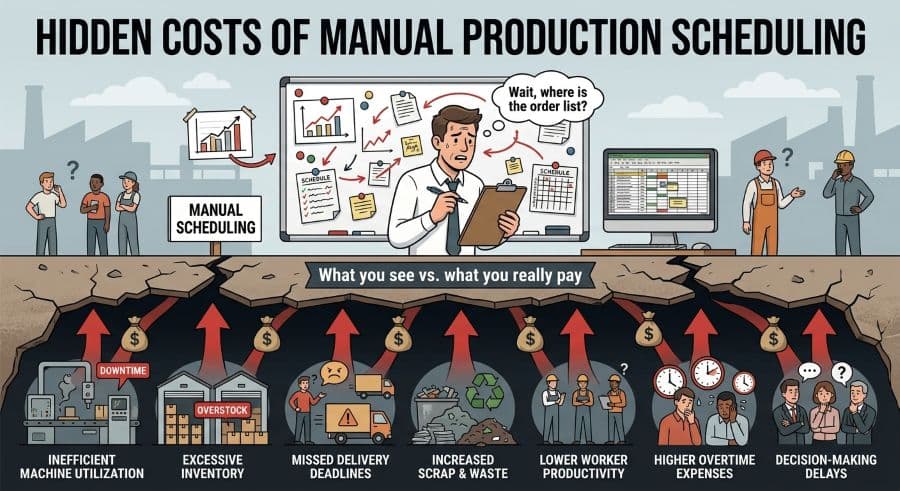
The Scheduling Problem Nobody Measures
Most production managers at SMB job shops know their scheduling process isn't working well. They've seen the rush order that displaced three other jobs. They've lived through the machine conflict that sent two machinists to the same CNC lathe and cost an afternoon of resequencing. They've had the customer call asking why a job that was "on track" is now running two days late.
What almost nobody has done is quantify what all of that costs. Not in vague terms — in actual dollars per year.
Let's do that math for a $2M revenue job shop running 12 machines.
Cost Driver 1: Manual Scheduling Labor
A production manager spending 10 hours per week maintaining a manual schedule — updating the whiteboard, reconciling the Excel spreadsheet, calling the floor to check machine status — is spending 520 hours per year on scheduling administration. At $45/hour loaded cost, that's $23,400 per year in scheduling labor alone — before a single bad decision is made.
Most shops we talk to estimate 8–15 hours per week. For larger shops running 25+ machines, the number is higher. This isn't floor time. It's the production manager's cognitive bandwidth, consumed by a spreadsheet instead of running the shop.
Cost Driver 2: Machine Conflict Incidents
A machine scheduling conflict — two jobs competing for the same machine window, discovered when the machinists arrive — costs $250–$1,000 per incident in restart time, priority reshuffling, and operator overtime. Industry benchmark: SMB job shops experience 2–4 unplanned scheduling incidents per month.
At 3 incidents per month at $500 average cost: $18,000 per year.
That's a conservative number. The high end — 4 incidents at $1,000 each — is $48,000 per year from conflicts alone. Many of these conflicts are visible in hindsight. None of them were visible in the spreadsheet before they happened.
Cost Driver 3: Unplanned Downtime Cascades
Unplanned machine stoppages — a tool break, a coolant failure, an operator absence — cost 35% more per minute than planned downtime because they cascade without warning into adjacent jobs on the schedule. Estimated cost: $1,000–$3,000 per incident, 2 incidents per month.
At 2 incidents per month at $2,000 average: $48,000 per year.
Cost Driver 4: Reactive Expediting and Overtime
When jobs slip, shops buy time with overtime. Emergency expediting — pushing a job to the front of the queue, paying overtime rates, air-shipping materials — runs $5,000–$15,000 per year for a shop doing $2M in revenue. Most of it is preventable with 48 hours of lead time. Most of it happens because the at-risk signal wasn't visible until the job was already late.
The Total
Scheduling labor: $23,400
Machine conflict incidents: $18,000
Downtime cascades: $48,000
Reactive expediting and overtime: $10,000
Total: ~$99,400 per year
That's for a single $2M shop with 12 machines, running conservative estimates. Qlector's 2025 research places the figure at 5–10% of annual revenue for SMB manufacturers — for a $2M shop, that's $100,000–$200,000.
What Purpose-Built Scheduling Software Costs
Visual Machine Scheduler Professional tier: $3,490/year. That's the plan designed for a 12-machine shop with a team of 10.
The ROI math: $99,400 in annual scheduling waste ÷ $3,490 annual subscription = 28× return on investment before a single incident is prevented. A single prevented machine conflict pays for more than a month of the subscription.
Why This Keeps Happening
The scheduling tools available to SMB job shops sit at two extremes. Excel and whiteboards are free but have no concept of finite capacity — they cannot detect that a machine is double-booked until two machinists walk up to it. Enterprise APS software (PlanetTogether and similar) costs $50,000+/year and requires an implementation project measured in months. The $199–$599/month price band for purpose-built visual machine scheduling is unoccupied.
That gap is what Visual Machine Scheduler was built to fill.
What to Do Next
Run the ROI calculator to put your shop's specific numbers into the model. It takes under 2 minutes and produces a PDF you can use to justify the subscription to ownership.
Or start the free trial — most shops are on a live Gantt board within 60 minutes of sign-up, with their existing job list imported from Excel.
Ready to go beyond the guide?
Most shops are on a live Gantt board within 60 minutes of sign-up, with their existing job list imported from Excel.
Get shop floor scheduling guides in your inbox
Practical articles for production managers — no spam, unsubscribe anytime.
Related articles
How to Handle Rush Orders Without Breaking Your Production Schedule
Every job shop gets rush orders. The ones that handle them without chaos have one thing in common: a live capacity view …
The 5 Production Scheduling KPIs Every Job Shop Should Track
Most job shops track OTD when a customer complains. The shops that consistently hit their due dates track five metrics w…
How to Improve On-Time Delivery in a Job Shop: A Practical 5-Step Guide
On-time delivery starts with knowing — before the customer calls — which jobs are at risk. Here's a 5-step guide to impr…