OEE Calculation for Manufacturers: A Plain-English Guide with Examples
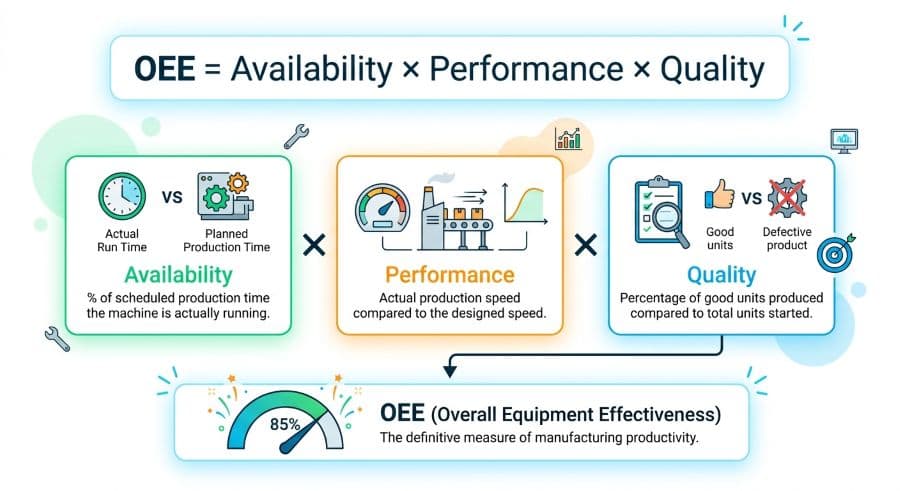
OEE is the most important machine metric most job shops never track. Availability × Performance × Quality = your real machine effectiveness.
A machine can run all day and still lose you money
Your busiest machining center ran the whole shift. The operator was there, the spindle was turning, finished parts came off the table. By every measure most shops actually track, that machine had a productive day.
Overall Equipment Effectiveness (OEE) is the metric that tells you whether that's true. And the first time a shop runs an honest OEE calculation, the number is almost always lower than anyone expected.
That gap — between "the machine was running" and "the machine was producing good parts at rate" — is where job shop capacity quietly disappears. It shows up as the job that was supposed to take six hours and took nine. The 4 PM realization that you're a day behind on a part you thought was done. The overtime you're paying to recover time you didn't know you'd lost.
OEE makes that loss visible and puts a single number on it. It's the most useful machine metric most job shops never calculate, partly because the explanations online bury it in TPM theory and partly because the worked examples use clean factory numbers that don't look anything like a real shop floor.
This guide fixes both problems. Here's exactly how to calculate OEE — availability, performance, and quality — with a full worked example using numbers that look like an actual shift, and a clear answer to the question that matters: once you have the number, what do you do with it?
What OEE actually measures
OEE rolls three separate losses into one percentage. The overall equipment effectiveness formula is the same everywhere it's used, and it's deliberately simple:
OEE = Availability × Performance × Quality
This is the standard industry definition, traced back to Seiichi Nakajima's work on Total Productive Maintenance (TPM literature). Each of the three factors is a percentage between 0 and 100%, and you multiply them together. That multiplication is the part people miss, and it's the part that makes OEE honest.
Here's why it matters. If your machine is available 90% of the time, runs at 90% of its rated speed when it's running, and produces 90% good parts, those don't average out to 90%. They multiply:
0.90 × 0.90 × 0.90 = 0.729, or 72.9%
Three "pretty good" numbers compound into a number that's nowhere near as good as any of them looked alone. That's not a quirk of the math. That's the truth about your machine that the individual numbers were hiding. A machine running at 73% effectiveness has roughly a quarter of its productive capacity going somewhere you can't see — and on a constrained machine, that quarter is the difference between hitting your due dates and chasing them.
The three factors answer three different questions:
- Availability — Of the time I planned to run this machine, how much was it actually running?
- Performance — While it was running, did it run as fast as it's capable of?
- Quality — Of the parts it produced, how many were good the first time?
Walk through each one with real numbers and the whole thing stops being abstract.
How to calculate availability
Availability measures lost production time — the difference between the time you scheduled the machine to run and the time it was actually running.
The formula:
Availability = Run Time ÷ Planned Production Time
The two terms that trip people up are planned production time and run time, so define them precisely.
Planned production time is the time you intended the machine to be producing. Start with the scheduled shift, then subtract planned, scheduled stops you've deliberately decided to take — lunch, scheduled breaks, planned preventive maintenance, the morning toolbox meeting. You are not penalizing the machine for time you never planned to run it. This is the single most important distinction in the entire calculation, and it's the one shops get wrong most often. More on that below.
Run time is planned production time minus all the unplanned stops: breakdowns, waiting for material, waiting for an inspection, a setup that ran long, the operator pulled away to firefight another job.
Worked numbers. Take one 8-hour shift on a single machine:
- Shift length: 480 minutes
- Planned stops (lunch + two breaks + toolbox meeting): 30 minutes
- Planned production time: 450 minutes
During those 450 minutes, the machine stopped for reasons you didn't plan:
- Material wasn't staged, machine waited: 25 minutes
- Setup ran long past the standard: 20 minutes
- Unplanned stop, chip evacuation jam: 15 minutes
- Total unplanned downtime: 60 minutes
So run time is 450 − 60 = 390 minutes.
Availability = 390 ÷ 450 = 86.7%
That 60 minutes of unplanned downtime is the expensive kind. Unplanned downtime runs about 35% more expensive than planned downtime (Arda Cards 2026), because you pay for it twice — once in the lost capacity and again in the scramble to recover the schedule around it. If you've never put a dollar figure on it, the true cost of unplanned downtime in a job shop is usually a multiple of what operators assume.
How to calculate performance
Performance measures speed loss — whether the machine, while it was running, ran at the rate it's actually capable of.
The formula:
Performance = (Ideal Cycle Time × Total Count) ÷ Run Time
Or, the same thing stated differently: the speed you actually ran divided by the speed the machine is rated to run. Performance catches the losses that availability can't see, because the machine never stopped — it just ran slow. Reduced feeds and speeds to protect a worn tool, minor stops under the threshold you'd log as downtime, an operator running conservatively on an unfamiliar part. None of that shows up as downtime. All of it shows up here.
Ideal cycle time is the fastest sustainable time to make one good part — the machine's rated capability for that job, not the average you happened to hit today.
Continuing the same shift:
- Ideal cycle time for this part: 2.0 minutes per part
- Total parts produced during the shift: 165
- Run time (from the availability step): 390 minutes
Ideal time to produce 165 parts: 2.0 × 165 = 330 minutes.
Performance = 330 ÷ 390 = 84.6%
Read that plainly: the machine spent 390 minutes producing parts that, at rated speed, should have taken 330 minutes. Sixty minutes of run time evaporated into slow running — and unlike a breakdown, nobody noticed, because the machine never stopped. This is the loss that's invisible without an OEE calculation. It feels like a normal shift right up until you check the math.
How to calculate quality
Quality measures the parts you made but can't ship — scrap and rework.
The formula:
Quality = Good Count ÷ Total Count
Good count is parts that met spec the first time through. Rework counts against quality even if the part is eventually saved, because rework consumed capacity you'll never get back and OEE is about effectiveness, not final yield.
Same shift:
- Total parts produced: 165
- Scrapped or sent to rework: 9
- Good parts, first pass: 156
Quality = 156 ÷ 165 = 94.5%
For a lot of shops, quality is the strongest of the three factors, which is exactly why it gets overlooked. A 94.5% quality rate sounds fine in isolation. The point of OEE is that it doesn't stay in isolation.
A full OEE calculation, worked end to end
Now multiply the three factors from that single shift on a single machine:
| Factor | Calculation | Result |
|---|---|---|
| Availability | 390 ÷ 450 | 86.7% |
| Performance | 330 ÷ 390 | 84.6% |
| Quality | 156 ÷ 165 | 94.5% |
OEE = 0.867 × 0.846 × 0.945 = 0.693, or 69.3%
Three healthy-looking numbers — none below 84% — multiply down to 69%.
Sit with that for a second, because it's the whole reason OEE exists. Nobody on that floor did anything obviously wrong. There was no breakdown, no quality crisis, no disaster in the log. Just an hour of unplanned stops, an hour of quiet slow-running, and a handful of bad parts. Each one looked minor. Together they took roughly a third of the machine's productive capacity off the table for the day, and not one of them would have shown up if you'd only tracked whether the machine was "up."
For reference, world-class OEE is 85% (Nakajima/TPM literature). That's the bar high-performing operations measure themselves against. The first time a job shop runs an honest calculation, the number usually lands well below that — not because the equipment is bad, but because the three losses compound and most shops have never measured all three at once. The number being low isn't a failure. It's the first time you've seen the truth, and it's the starting line.
One worked shift on one machine is the unit you build from. Run the same calculation across every machine, every shift, for a couple of weeks, and patterns surface fast: one machine always loses availability waiting for material, another always loses performance on a specific part family. Those patterns are where the recoverable capacity is.
Where shops get the OEE calculation wrong
Four mistakes account for most of the bad OEE numbers in circulation. Get these right and your number is trustworthy enough to make decisions on.
1. Calculating against calendar time instead of planned production time. This is the big one. OEE measures effectiveness during the time you intended to run. It is not the same as utilization, which compares run time against the full calendar. If your shop runs one shift, Monday to Friday, the machine is idle nights and weekends by design — that's a capacity and scheduling question, not an OEE problem. Dividing by all 168 hours in the week structurally caps the result below 50% and tells you nothing about how well the machine ran when it was supposed to. If what you actually want to know is how much of your available calendar you're using, that's a different metric — the machine utilization rate — and it answers a different question. Keep them separate.
2. Forgetting that the factors multiply. Plenty of shops track availability and call it OEE. Availability alone is a real number, but it ignores speed loss and quality loss entirely, and those are exactly the losses you can't see by walking the floor. If your "OEE" is really just availability, you're flattering the machine.
3. Using an aspirational ideal cycle time. Performance is only honest if the ideal cycle time is the machine's genuine rated capability for that part — the fastest you've sustainably run it good, not a number from a quote or a wish. Set the ideal too high and performance looks artificially terrible. Set it too low and you'll never see the speed loss that's actually there.
4. Not counting rework against quality. A part that needs a second operation to save it consumed capacity twice. If you only count outright scrap, your quality factor — and your whole OEE — reads higher than reality.
These four are sometimes mapped to the classic "six big losses" framework from TPM: breakdowns and setup losses (availability), small stops and reduced speed (performance), and startup rejects and production rejects (quality). You don't need the framework to calculate OEE correctly. You do need to make sure every real loss lands in exactly one of the three buckets, and none of them gets quietly dropped.
What your OEE number is actually telling you
OEE is a diagnostic, not a scoreboard. A single number — 69%, 74%, whatever you get — isn't the point. The value is in the three components, because each one points at a different fix.
If availability is your weakest factor, your problem is stopped time: material not staged when the machine is ready, long setups, waiting on inspection, the operator pulled to fight a fire on another job. Most of that is a scheduling and material-flow problem, not a machine problem. Shops that schedule reactively — slotting in every rush order by bumping whatever was running — tend to bleed availability, because every reshuffle creates a new setup and a new gap.
If performance is weakest, your problem is speed: conservative feeds and speeds, tool wear, minor stalls, operators unsure of a part. This one rewards standardizing the proven cycle time for repeat parts and giving operators the rated numbers instead of leaving them to guess.
If quality is weakest, the loss is downstream of the machine — fixturing, programming, tooling, inspection cadence — and it's usually the most expensive per part, because you've already spent the cycle time before the part fails.
OEE isn't a metric you track in isolation. It sits alongside the other production scheduling metrics and KPIs that tell you whether your shop is keeping its promises — on-time delivery, schedule adherence, throughput. OEE explains why those numbers move. When on-time delivery slips, a per-machine OEE breakdown usually shows you the constraint machine and which of the three losses is eating it.
The practical starting point is unglamorous: pick your most constrained machine — the one that gates the rest of the shop — and log one number per shift for each factor. Planned production time, downtime, parts run, scrap. A clipboard works. A spreadsheet works better because it'll do the arithmetic. After two weeks you'll have a per-machine OEE you can act on, and you'll already know which of the three losses is costing you the most.
Start with one machine, one shift
OEE turns a vague sense that "the schedule keeps slipping" into a specific, measurable loss you can attack. Availability × Performance × Quality gives you one honest number, and — more usefully — three separate levers, each pointing at a different fix.
You don't need software to start. The OEE calculation in this guide runs on a clipboard and a calculator. Pick your constraint machine, log the four inputs per shift for two weeks, and you'll have a real number and a clear idea of where your capacity is going. If you'd rather not build the tracking yourself, our shop tools and templates include ready-made trackers you can fill in from day one.
The harder problem usually isn't measuring OEE once you decide to. It's that the losses OEE exposes — stopped machines waiting on material, setups stacking up, the schedule churning every time a hot job lands — are scheduling problems, and a clipboard won't fix those. Seeing every machine's real load on one screen, before you commit a due date, is what keeps availability from leaking in the first place. That's the problem Visual Machine Scheduler is built to solve, and the 14-day trial doesn't ask for a card. But measure first. The number will tell you whether it's worth the look.
Ready to go beyond the guide?
Most shops are on a live Gantt board within 60 minutes of sign-up, with their existing job list imported from Excel.
Get shop floor scheduling guides in your inbox
Practical articles for production managers — no spam, unsubscribe anytime.
Related articles
The True Cost of Unplanned Machine Downtime in a Job Shop (It's 35% More Than You Think)
Unplanned downtime doesn't just cost the hours the machine is stopped — it costs the resequencing labor, the emergency o…
How to Calculate Machine Utilization Rate (With Free OEE Template)
Machine utilization rate is one of the most important metrics in a job shop, but most production managers have no reliab…
Machine Capacity Planning for Job Shops: How to Know What You Can Actually Take On
The most expensive words in a job shop: "Yeah, we can do that by Friday." Capacity planning means knowing before you com…