Tier 2 Auto-Supply Machining in Detroit: Scheduling Under EDI and IATF 16949
When your customer is a tier 1 auto supplier and they release demand via EDI, your scheduling system has to react in hours, not days. Detroit's tier 2 shops have lived in this rhythm for decades.
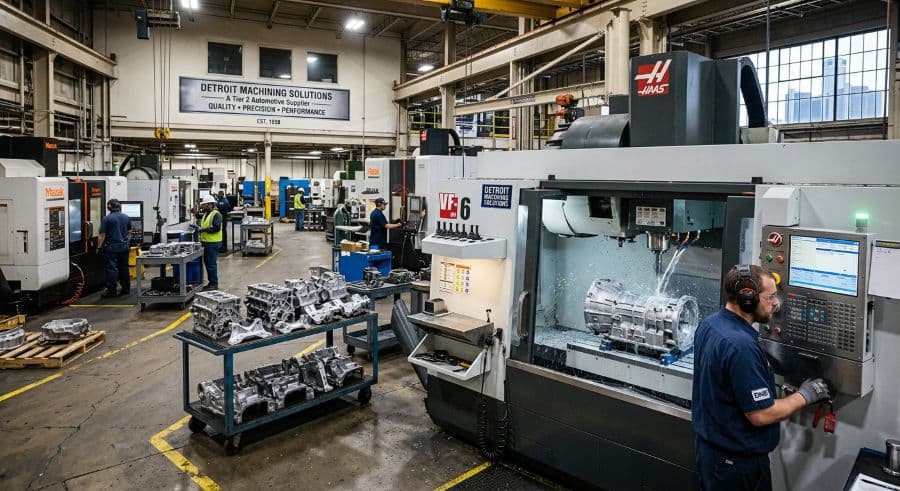
The 7 a.m. release that resets your whole week
It's a Monday in a Warren or Sterling Heights machine shop. Before the first operator badges in, an EDI transmission lands from your tier 1 customer: next week's firm quantity on your highest-volume part just moved up, and the week after dropped. Nobody called. Nobody emailed. The number simply changed in a machine-readable file, and your ship-to commitment changed with it.
That is the daily reality of auto tier supplier scheduling in Detroit. When your customer is a tier 1 — or an assembly plant feeding directly off your parts — and they release demand through electronic data interchange (EDI), your schedule is not something you set on Friday for the following week. It is something the supply chain edits for you, on its own cadence, in a format your planner has to read and react to fast.
A scheduling conflict that reaches the floor in this environment is not cheap. Each incident runs roughly $250–$1,000 in machine restarts, resequencing, and lost capacity (Product Brief §2). In an EDI-driven shop those conflicts don't wait for a convenient moment — they arrive on the customer's clock, not yours.
This article covers what an EDI release actually tells your shop floor, how IATF 16949 turns scheduling into a traceability problem, and why the tools most tier 2 and tier 3 shops inherited struggle to keep that pace.
Detroit tier suppliers sit downstream of demand they don't control
The defining feature of auto tier supplier production scheduling in Michigan is position in the chain. The OEM publishes a build plan. Tier 1 suppliers translate that into component demand and release it to tier 2 shops. Tier 2 releases sub-component and machined-part demand to tier 3. Every adjustment upstream cascades down, and by the time it reaches a 30-machine contract shop, the change is firm, dated, and tied to a delivery you already promised.
Southeast Michigan packs an unusual density of these shops into a small radius, which is exactly why the region's supply base can run on hours of notice instead of days. If you want the wider picture of who's in this corridor and what they make, the Detroit auto-tier machining landscape lays it out, and the mold and die side of the same corridor runs on a different but related tempo.
The practical consequence is simple to state and hard to live with: your scheduling system has to react to demand changes in hours, not days. A shop that re-plans once a week is structurally late.
What an EDI release actually tells your shop floor
EDI is not a single message. For a North American auto supplier, the demand signal usually arrives as a small family of ANSI ASC X12 transaction sets, and each one means something different on the floor.
The 830 (Planning Schedule with Release Capability) is the workhorse. It carries a horizon: near-term quantities the customer is committing to, followed by forecast quantities further out that will firm up as the weeks roll forward. The near buckets are a build instruction. The far buckets are a planning input, not a promise.
The 862 (Shipping Schedule) is the tighter signal. It supplements the 830 with firm, often just-in-time ship instructions for the immediate window — the message that says these specific quantities, this specific day. When a shop is running daily or shift-level deliveries, the 862 is what the shipping desk lives by.
When you ship, you send back an 856 (Advance Ship Notice), the electronic packing slip that lets the customer receive against the release without manual entry. A late or inaccurate 856 is its own failure mode, separate from a late part.
Two details make EDI release scheduling for an auto supplier harder than it looks on paper. First, automotive releases are typically cumulative: quantities are stated as running totals, and you reconcile the cumulative quantity you've shipped against the cumulative quantity required. Miss the reconciliation and you can be technically "ahead" on one shipment while behind on the contract. Second, the conventions for how these messages are formatted and interpreted are published by the Automotive Industry Action Group (AIAG), whose EDI implementation guidelines are the reason a tier 1 in Auburn Hills and a tier 2 in Macomb County can read the same file the same way.
None of this is a phone call you can write on a whiteboard. It's structured data that has to land in your schedule, change it, and leave a trail.
IATF 16949 makes the schedule part of your quality record
Demand is only half the pressure. The other half is the quality system. Most Detroit tier suppliers are certified to IATF 16949, the automotive quality management standard maintained by the International Automotive Task Force on top of ISO 9001 and administered in North America alongside AIAG. IATF 16949 scheduling considerations show up in three places that a generic production schedule usually ignores.
Traceability. The standard puts heavy weight on knowing which material became which part and went to which customer. In practice that means your schedule can't just say "run part X on the VMC Tuesday." It has to connect that run to the lot consumed, the machine used, the shift, and the release it satisfied — the same job-to-lot link your cumulative EDI reconciliation already depends on.
Production scheduling that meets customer requirements. IATF 16949 expects scheduling to be order-driven and capable of supporting just-in-time delivery, which is the standard's way of saying a forecast-and-hope schedule isn't sufficient when the customer is releasing firm quantities weekly.
Contingency planning. The standard includes contingency-planning requirements (clause 6.1.2.3 in the 2016 edition) covering interruptions such as equipment failure, utility loss, and labor shortage. The scheduling implication is direct: you're expected to keep delivering through a disruption, which means you need to re-plan around a downed machine without losing the rest of the week — and keep a record of how you did it.
A note on scope: this is a description of how the standard interacts with scheduling, not compliance advice. The exact requirements, clause references, and how they apply to your operation should be verified with your registrar or auditor.
Why spreadsheet and ERP-module scheduling fall behind the EDI rhythm
The cost of manual scheduling is easy to underestimate because it never shows up as a line item. Industry research puts the hidden cost of manual scheduling at 5–10% of revenue in a typical job shop (Qlector 2025) — for a $2M shop, $128,000–$276,000 a year once restarts, expedites, and idle capacity are added up. In an EDI environment, the biggest contributor to that figure is re-work: every time a release moves, someone re-types it.
Spreadsheet-based scheduling breaks first. A 830 changes, a planner edits a cell, and the version on the planner's laptop drifts from the version taped to the wall and the version the shipping desk is working from. There's no link between the spreadsheet row and the cumulative quantity owed, so reconciliation is a separate manual chore done from memory.
ERP-based scheduling modules don't break the same way, but they tend to be built around the work order or job, not the rolling release. Many of them can absorb an EDI feed, but the scheduling view is a report you run rather than a board you plan on — and when demand shifts midweek, re-sequencing inside a rigid ERP screen is slow enough that planners quietly fall back to a spreadsheet anyway. The full reasoning on why this happens is worth its own read in the job shop production scheduling guide.
Enterprise APS platforms sit at the other extreme. They do finite-capacity optimization that can model an entire multi-plant network, but they're priced and implemented for that scale: multi-month rollouts and an existing ERP to integrate against. For a 30-machine shop that just needs to re-plan a week in fifteen minutes, that's a heavier system than the problem requires.
A worked example: one release, one week
Say a 35-employee contract shop in Macomb County runs nine CNC machining centers and supplies a stamped-and-machined bracket to a tier 1 on a weekly release. Monday's 830 has been steady for a month: roughly 4,000 pieces a week, shipping Wednesday and Friday. The planner has the week sequenced around it, with two of the nine machines committed to that part and the rest filling other customers' work.
Tuesday morning, a fresh 830 lands. The tier 1's customer pulled an extra build ahead, and the firm quantity for the current week jumps to about 5,200, with the bump weighted toward Friday's ship. The 862 that follows confirms the new Friday quantity as firm and dated.
On a spreadsheet, this is a bad morning. The planner re-types the new quantities, recalculates how many machine-hours the bracket now needs, figures out which other jobs slip to make room, and then walks the floor to tell three different cell leads what changed — while the version on the wall is already wrong. Somewhere in that scramble, the cumulative quantity owed has to be re-reconciled by hand so the Friday 856 doesn't overship or undership against the contract total.
On a schedule built for the release rhythm, the same change is a re-sequence: the planner extends the bracket's run on its two committed machines, pulls a third machine in for the overflow, sees instantly which lower-priority jobs reflow to next week, and the floor sees the new board without a second conversation. The job still carries its lot and release link, so reconciliation and traceability don't become a separate task. The difference between those two mornings — repeated every time a release moves — is most of the hidden scheduling cost in a tier 2 shop.
What a tier 2 schedule has to do that a generic one doesn't
Strip away the acronyms and the requirements converge on a short list of capabilities. A schedule built for Detroit auto-tier work has to do four things a generic schedule doesn't.
- Re-sequence fast when a release moves. A new 830 or 862 should turn into a re-planned week in minutes, not a morning of retyping. The whole point of reacting in hours is lost if the act of re-planning takes most of a day.
- Tie every job to the release and lot it satisfies. This is where EDI reconciliation and IATF traceability are the same requirement wearing two hats. One job-to-lot-to-release link serves both.
- Absorb a machine going down without losing the week. Unplanned downtime is about 35% more expensive than planned downtime (Arda Cards 2026), and an EDI shop can't simply push every job a day — the ship dates are fixed by someone else. The schedule has to show you, immediately, what reflows onto which machines.
- Keep everyone looking at the same picture. The planner, the floor lead, and the shipping desk all need the current schedule, not three copies at three stages of staleness. Shared visibility is what kills the version-drift problem at the root.
This rhythm isn't unique to Detroit. Shops in other Midwest machining corridors that supply automotive face the same release cadence — if you run in the Chicago–Rockford machining corridor, the EDI-and-IATF combination will look familiar even though the customer mix differs.
Visual Machine Scheduler is built around exactly this list: a drag-and-drop board where moving a job re-sequences the affected machines in front of you, jobs carry the context that traceability and reconciliation need, and the whole shop sees one current schedule. It isn't an ERP and it doesn't try to be — it's the planning layer that sits where the spreadsheet used to.
The next step in your scheduling decision
If your demand arrives as EDI releases and your quality system is IATF 16949, the question isn't whether your schedule needs to keep up — it's whether the tool you're using can re-plan a week in the time you actually have when a release changes at 7 a.m. Spreadsheets can't hold the link between a job, a lot, and a cumulative release. Enterprise APS can, but at a scale and cost most tier 2 and tier 3 shops don't need.
Want to see this against your own release schedule? Start a free 14-day trial of Visual Machine Scheduler — no credit card required. If you're not ready to put it on the floor yet, our store of scheduling templates and tools is a lighter place to start, and you can move up to the software when the EDI rhythm makes the spreadsheet untenable.
Ready to go beyond the guide?
Most shops are on a live Gantt board within 60 minutes of sign-up, with their existing job list imported from Excel.
Get shop floor scheduling guides in your inbox
Practical articles for production managers — no spam, unsubscribe anytime.
Related articles
Scheduling an API-Certified Machining Operation: Traceability and Documentation Considerations
API-certified machining isn't just a quality label. It's a documentation chain that has to follow every part from raw ma…
Project-Based Scheduling for Oil & Gas Machine Shops: When the Rig Count Drives Demand
Oil & gas machining doesn't run on a manufacturing-belt rhythm. It runs on rig counts, capital project gates, and well c…
Long-Cycle Job Scheduling for Mold & Die Shops: The 12-Week Build Problem
Mold and die shops are the longest-cycle work in machining. A single program can occupy a machining center for 6–14 week…