Customer-Facing OTD Reports: Turning Your Schedule Into a Sales Asset
Most job shops never share their OTD numbers with customers — because they don't think the numbers look good enough. The ones that do share them often win the account.
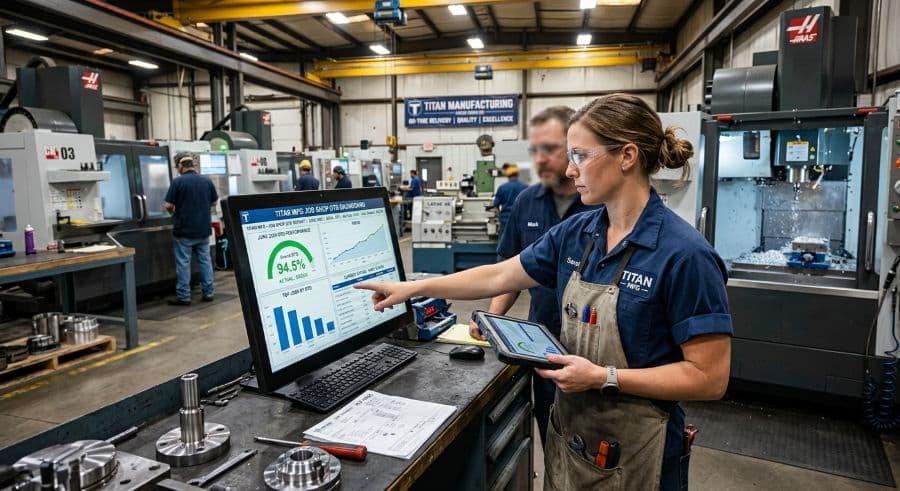
Your customer already has an OTD report. You just didn't write it.
Somewhere in your largest customer's purchasing system there is a supplier scorecard with your shop's name on it. It records every shipment you've sent, flags the ones that arrived late, and rolls the whole thing into a number their procurement team reviews when contracts come up for renewal. You have probably never seen it. You almost certainly didn't write it.
That is the real on-time delivery report — the one being used to make decisions about your business — and right now someone else controls it.
A customer-facing OTD report flips that. Instead of letting your customer's data tell the story, you bring your own version of the number to the table: scoped to their jobs, framed around the commitments you actually made, and delivered before the renewal conversation, not during it. Done well, it turns a metric you've been hiding into one of the most persuasive sales assets a job shop has.
Here's how to build one — what goes in it, how to define "on time" so the number means something, and how to produce it without exposing the day-to-day chaos of your shop floor.
Why most shops keep their OTD numbers in a drawer
Ask a shop owner for their on-time delivery percentage and you'll usually get one of three answers: a confident number that turns out to be a guess, a defensive "it depends on how you measure it," or an honest "I don't really track it cleanly."
All three are reasons the report never gets shared.
The first reason is fear. Most shops assume their OTD number looks bad, so they'd rather not put it in writing where a customer can hold them to it. The irony is that the customer already has a number — and the one they've calculated, with no context and the strictest possible definition of "late," is almost always worse than the one you'd produce yourself.
The second reason is data. Pulling a clean OTD figure out of a whiteboard, a stack of travelers, or a spreadsheet that three people edit means a half-day of reconstruction. A report that costs half a day to produce gets produced once and never again.
The third reason is honesty about definitions, and it's the one worth slowing down on, because it decides whether your report is credible or just marketing.
A customer-facing OTD report is not your internal dashboard
The mistake shops make when they finally decide to share OTD data is handing the customer their internal view. Don't.
Your internal dashboard is for running the shop. It shows machine conflicts, the jobs you resequenced this week, the expedite that blew up Tuesday's plan, the work centers running hot. That information is operationally vital and commercially radioactive. No customer needs to see how many times you rescheduled their job internally as long as it shipped on time — and showing them invites questions you don't want to answer.
The report you hand the customer is a different document with a different job. It's scoped to one customer's jobs, it reports outcomes rather than process, and it's framed around the commitments you made to them. It answers exactly one question: did we deliver what we promised, when we promised it? Everything that doesn't serve that question — other customers' data, internal utilization, the reschedule churn, the conflicts that nearly caused a miss — stays on the shop floor where it belongs.
Think of it the way you'd think about a restaurant kitchen. The customer judges the plate. They don't need to watch the line during the dinner rush.
Define "on time" before your customer defines it for you
This is the part most shops skip, and it's the part that makes or breaks the report's credibility.
"On-time delivery" is not a fixed quantity. It moves depending on four decisions, and if you don't make them deliberately, your customer will make them for you — usually in the strictest way available.
Promise date or request date? A customer asks for a part on the 10th. You commit to the 15th. You ship on the 15th. On time? Against your promise, yes. Against their original request, no. Most shops report promise-date OTD; most customers track request-date OTD. If you don't state which one your report uses, the buyer assumes the harsher one. Name it explicitly.
When does the clock stop? Ship date, delivery date, or dock date at the customer? A part that leaves your dock on the 15th and arrives on the 17th is on time by your measure and late by theirs. Pick one, define it, apply it every period.
What counts as a complete shipment? If you ship 80% of a line on time and the balance three days later, is the line on time, late, or split? Partial shipments are where OTD percentages quietly inflate. Decide the rule and disclose it.
What's the denominator? OTD percentage is on-time line items divided by total line items — but "line items" can mean order lines, shipment lines, or release lines, and the three produce different percentages from the same raw data.
None of these is the one "correct" definition. The right move is to choose them, write them at the top of the report, and use the same set every period so the trend is real. A clearly defined 92% is more persuasive than an undefined 98%, because the buyer knows the 92% will survive scrutiny. If you want a fuller treatment of which numbers belong in your scheduling reporting in the first place, the scheduling metrics and KPIs guide covers the internal side.
What belongs in the report — and what stays on the shop floor
A customer-facing OTD report should fit on one page. The contents:
- OTD percentage for their jobs over a defined period — usually trailing quarter and trailing twelve months, against the definitions you stated up top.
- The trend. One number is a snapshot; three or four periods is a story. A buyer cares more about the direction than the absolute value.
- On-time versus late count, in plain integers. "47 of 51 line items on time" lands harder than a bare percentage.
- Average days early or late on the misses. A shop that's late by one day reads very differently from a shop that's late by two weeks at the same OTD percentage.
- A summary-level cause category for the misses — material delay, engineering change, capacity, customer-driven. Kept honest and high-level, this builds trust instead of eroding it, and it quietly documents the misses that weren't your fault.
- A forward look. Current open orders and their committed dates. This turns a historical report into a planning document and gives the buyer a reason to keep reading.
What stays out: machine-level data, internal efficiency metrics like OEE, other accounts, and any process detail that exists to run the shop rather than to answer the customer's one question.
Keep the format flat and portable. A one-page PDF the buyer can forward beats a login to a live dashboard they'll never check, and it keeps the data scoped to the snapshot you chose rather than whatever the dashboard happens to show on the day they look. The point is a document you control, not a window into your shop. Date it, version it, and send the same shape every period — consistency is what lets the trend carry the argument.
Define the cadence — and know who actually reads it
A customer-facing OTD report has four natural moments.
The quarterly business review. If you run QBRs with key accounts, the OTD report is the spine of the meeting. Bring it before they ask for it.
An at-risk account. When a relationship is wobbling after a bad stretch, a clear-eyed report that names the misses, shows the recovery trend, and lists the corrective actions does more to hold the account than a defensive phone call. Shops that share OTD data after a rough patch tend to keep accounts that shops who go quiet tend to lose.
A new account. During onboarding, showing how you measure and report OTD signals that you take delivery performance seriously. It sets the definitions on your terms before the first late shipment forces the conversation.
After a recovery. If you've spent a quarter fixing your delivery performance, the report is how you collect the credit. Improvement nobody sees doesn't help you at renewal.
The audience is usually the buyer or supply chain manager. Occasionally it's their boss — or even their customer, since a contract shop's OTD number sometimes becomes evidence in the next tier's own supplier review. Write the report clean enough that it can travel.
The report should be a byproduct, not a project
Everything above is useless if producing the report is a half-day archaeology dig through travelers and spreadsheets. A report that's painful to generate gets generated once.
The fix is upstream. When your schedule lives in one place and every job carries its promised date and its actual ship date, OTD stops being a reconstruction project and becomes a query. You filter by customer, set the date range, apply your stated definitions, and the number is there. The same system that prevents the late shipments produces the proof that they didn't happen.
This is also where the internal and external views finally reconcile. A scheduling conflict that reaches the floor costs $250–$1,000 per incident in restart, resequencing, and lost capacity (Product Brief §2) — and each one is a potential late shipment headed for a customer's scorecard. Catch it on a live schedule before it ships late and it never enters the report you'd rather not write. Fix the underlying delivery performance and the customer-facing report largely writes itself.
Bring your number before they bring theirs
Your OTD number is a sales asset whether you treat it as one or not. The only real choice is whether you bring your version to the table or let the customer's version — stricter, context-free, and calculated without your input — speak for you at renewal time.
Start small. Pick your single most important account, define "on time" using the four decisions above, pull the trailing four quarters, and put it on one page. Send it ahead of your next review. The first report is the hard one; after that it's a recurring filter on the same data.
If you'd rather not build the template from scratch, the reporting templates and trackers in our store are built for exactly this. And if pulling the numbers is the real bottleneck — if OTD is currently a half-day spreadsheet job — that's the part worth fixing at the source.
Want to see your OTD number become a one-click report instead of a reconstruction project? Start a free trial of Visual Machine Scheduler. No credit card required, 14-day trial. Put your real schedule in, ship a few jobs, and the report your best customer wishes you'd send is already waiting.
Ready to go beyond the guide?
Most shops are on a live Gantt board within 60 minutes of sign-up, with their existing job list imported from Excel.
Get shop floor scheduling guides in your inbox
Practical articles for production managers — no spam, unsubscribe anytime.
Related articles
How to Handle Rush Orders Without Breaking Your Production Schedule
Every job shop gets rush orders. The ones that handle them without chaos have one thing in common: a live capacity view …
The 5 Production Scheduling KPIs Every Job Shop Should Track
Most job shops track OTD when a customer complains. The shops that consistently hit their due dates track five metrics w…
How to Improve On-Time Delivery in a Job Shop: A Practical 5-Step Guide
On-time delivery starts with knowing — before the customer calls — which jobs are at risk. Here's a 5-step guide to impr…