Finite Capacity Scheduling Explained: Why It Matters for Job Shops
Excel and most basic MRP systems use infinite capacity logic — they let you schedule 30 hours onto a machine that runs 8 hours a day.
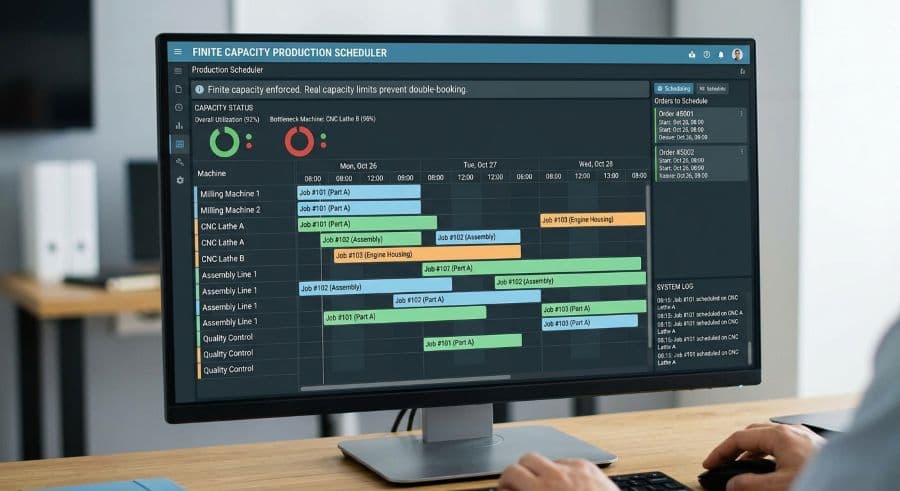
The schedule your spreadsheet just accepted is impossible to run
Open your scheduling spreadsheet and try this: drop 30 hours of work onto a machine that runs 8 hours a day. The spreadsheet takes it. No warning, no red cell, no question about whether you've lost the plot. It sums the column, prints the plan, and hands you a delivery date that was never physically possible.
That's infinite capacity scheduling, and it's the silent default in almost every tool a job shop uses to plan work — Excel grids, whiteboards, and the scheduling screen bolted onto most MRP systems. They treat each machine as a bucket with no bottom. You can pour in as many hours as you want, and the tool will happily tell you it all fits.
Finite capacity scheduling is the opposite assumption. It treats a machine as what it actually is: a resource with a fixed number of hours in a day, a shift calendar, and exactly one job running through it at a time. When the hours are gone, they're gone, and the next job waits for an opening.
This article explains what finite capacity scheduling is, why the infinite-capacity default quietly wrecks your due dates, what it costs when a conflict reaches the floor, and how to tell when your shop has outgrown the bucket-with-no-bottom approach.
What finite capacity scheduling actually means
Finite capacity scheduling is a method that schedules work against the real, bounded capacity of each machine and refuses to load more hours than the resource has. Infinite capacity scheduling does the reverse — it assumes unlimited capacity and lets the math work out later, usually on the floor.
The difference shows up the moment you do the arithmetic. A machine available 8 hours a day, 5 days a week, has 40 hours of capacity in that week. Finite vs infinite capacity planning is the question of what happens when you try to book the 41st hour. An infinite-capacity tool books it without comment. A finite-capacity tool either blocks it or pushes it into the next open slot — Monday of the following week, say — and shows you the real completion date that results.
That single behavior changes what a schedule is. Under infinite capacity, a schedule is a wish list: everything you'd like to ship, stacked by due date, with no regard for whether the floor can produce it. Under finite capacity, a schedule is a forecast: a sequence the shop can actually run, with completion dates that hold up because they were built from real open time.
A worked example: the same week, two ways
Take a 35-employee contract machining shop with a single 5-axis mill that's the bottleneck for half its jobs. The mill runs one 8-hour shift, Monday to Friday — 40 hours of capacity for the week.
Five jobs come in, each needing 12 hours on that mill: 60 hours of work against 40 hours of capacity.
Infinite capacity logic schedules all five to finish this week. The spreadsheet sums 60 hours, sees five due dates it can satisfy on paper, and reports green across the board. The production manager promises all five customers a Friday ship date.
Finite capacity logic schedules the first three jobs (36 hours) into this week and pushes the remaining two into Monday and Tuesday of next week. It reports two jobs late — now, on Monday, while there's still time to call the customer, add a Saturday shift, or move work to a second machine.
Same five jobs. Same 40-hour mill. The only difference is whether the schedule was allowed to lie. The infinite-capacity plan looks better on Monday and falls apart on Friday. The finite-capacity plan looks worse on Monday and holds all week. For a shop whose reputation rides on hitting due dates, that trade is not close.
Why your current tools assume infinite capacity
This isn't a flaw someone forgot to fix. It's an architecture choice baked into the tools.
A spreadsheet is a grid of cells. It has no concept of a machine, a shift, a setup time, or the fact that one job blocks the next. You can build heroic conditional formatting to flag overloads, but you're hand-coding a model of your shop into software designed to add up numbers. It will always be one rushed edit away from lying to you. Most shops eventually hit the wall where the spreadsheet costs more time than it saves — which is the whole case for moving off Excel for production scheduling.
MRP systems have a different reason. Classic Material Requirements Planning was built to answer a materials question — what to buy and when — not a capacity question. The standard MRP run back-schedules from each job's due date and assumes the work centers can absorb whatever it assigns. That assumption is infinite capacity by design. It's why finite capacity scheduling in manufacturing is usually sold as a separate module or a bolt-on rather than a core ERP feature: the underlying engine was never built to respect a ceiling.
Neither tool is stupid. Both were built for a job that isn't "tell me the sequence my shop can actually run."
What the infinite-capacity default costs you on the floor
The cost isn't theoretical. It lands as specific, repeatable events.
When a schedule promises more than a machine can deliver, the overflow doesn't disappear — it surfaces as a conflict on the floor. Two jobs need the same machine at the same time, someone notices at 3 PM, and the shop scrambles to resequence. A scheduling conflict that reaches the floor costs $250–$1,000 per incident (Product Brief §2) in machine restarts, resequencing, and the capacity you lose while people sort it out. Prevention beats cleanup here, which is the entire point of catching machine scheduling conflicts before they reach the floor.
The bigger number is the slow bleed. The hidden cost of manual scheduling runs 5–10% of revenue for a typical job shop (Qlector 2025). For a $2M shop, that's $128,000–$276,000 a year disappearing into missed due dates, expedite premiums, idle machines waiting on the wrong sequence, and the overtime you burn catching up.
Infinite-capacity planning also distorts maintenance decisions. When the schedule says a machine is booked solid, planned downtime looks unaffordable, so it gets deferred — until the machine fails mid-job. Unplanned downtime runs 35% more expensive than planned downtime (Arda Cards 2026), and an overloaded schedule is exactly the condition that pushes maintenance off the calendar. The missed due dates compound from there; closing that gap is the core of improving on-time delivery in a job shop.
How finite capacity scheduling works in practice
A finite capacity scheduler models three things your spreadsheet doesn't: the machine's calendar, the job's real duration, and the rule that a machine runs one job at a time.
Each machine gets a calendar — shift hours, weekends, planned maintenance windows. Each job gets a duration that includes setup, not just run time. The scheduler then places jobs into actual open time. When a machine's day is full, the next job doesn't stack on top of the current one; it lands in the next genuinely available slot. The completion date you see is the one the floor will hit.
The visible version of this is a drag-and-drop Gantt. Move a job earlier and the jobs behind it reflow automatically; if the move creates an overload, the conflict shows up immediately instead of three days later on the floor. You're scheduling against reality in real time, not auditing a spreadsheet after the fact. That live, constraint-aware view is the difference between a capacity plan you can trust and a guess.
Finite scheduling also tells you something uncomfortable and useful: how little true capacity you have. A two-shift, Monday-to-Friday operation runs 80 of the 168 hours in a week — structurally under 50% of the calendar before you account for setups, changeovers, or a single breakdown. Infinite capacity hides that ceiling. Finite capacity puts it on the screen, which is the first step to scheduling around it instead of pretending it isn't there.
Finite capacity loading isn't the same as finite scheduling
A distinction worth getting right, because it trips up a lot of software evaluations. Some tools do finite capacity loading: they total the hours assigned to each machine and tell you which ones are over capacity for a given period. That's useful — it catches the 60-hours-on-a-40-hour-mill problem at a glance.
But loading only tells you a machine is overbooked, not what to do about it. It doesn't sequence the jobs, doesn't respect setup times, and doesn't tell you which specific job slips to next Tuesday and which customer to call. It's a smoke alarm, not a plan.
Finite capacity scheduling goes the rest of the way. It takes the same capacity ceiling and actually orders the work inside it — job by job, machine by machine, in real time — so the output is a runnable sequence with honest completion dates, not just a red flag on an overloaded column. When you evaluate tools, that's the line that matters: does it warn you about the overload, or does it resolve it?
When you actually need finite capacity scheduling software
Infinite capacity isn't always wrong. If you run a handful of machines, carry plenty of slack, and rarely have two jobs competing for the same resource, a spreadsheet is honest enough. The bucket never overflows because you never fill it.
You've outgrown that when a few conditions show up together. Jobs routinely compete for the same machines. Your due-date promises depend on getting the sequence right, not just the total workload. You're tracking more concurrent jobs than you can hold in your head — past roughly 20, the spreadsheet stops being a tool and becomes a liability. And you're losing real money to conflicts and expedites that all trace back to a plan that was never runnable.
That's the point where finite capacity scheduling software earns its keep. The job isn't to replace your judgment — it's to enforce the one rule a spreadsheet can't: you cannot run more hours than the machine has. Everything else, the Gantt and the reflow and the live completion dates, follows from holding that line.
Where this leaves your scheduling decision
The move from infinite to finite capacity scheduling isn't really a software upgrade. It's a change in what you let your schedule claim. Infinite capacity lets the plan promise anything; finite capacity makes the plan tell the truth about what the floor can produce.
If you're deciding whether your shop needs it, don't start with the software. Start with the arithmetic. Add up the real available hours on your two or three most-contested machines this week, then compare that to the hours of work already promised against them. If the promised hours exceed the available hours, your current schedule is running on infinite-capacity logic — and the gap is the work that's going to be late.
When you're ready to put numbers to it, the machine capacity planning guide walks through that calculation in detail, and the trackers in our store are built for it. If you'd rather skip the spreadsheet entirely and see your real, finite capacity on a live Gantt, start a free MachineScheduler trial — no credit card, 14 days.
Ready to go beyond the guide?
Most shops are on a live Gantt board within 60 minutes of sign-up, with their existing job list imported from Excel.
Get shop floor scheduling guides in your inbox
Practical articles for production managers — no spam, unsubscribe anytime.
Related articles
How to Handle Rush Orders Without Breaking Your Production Schedule
Every job shop gets rush orders. The ones that handle them without chaos have one thing in common: a live capacity view …
The 5 Production Scheduling KPIs Every Job Shop Should Track
Most job shops track OTD when a customer complains. The shops that consistently hit their due dates track five metrics w…
How to Improve On-Time Delivery in a Job Shop: A Practical 5-Step Guide
On-time delivery starts with knowing — before the customer calls — which jobs are at risk. Here's a 5-step guide to impr…